How to Load Test a Contact Centre Before a Peak Event
A practical plan to load test a contact centre before a peak event: model the peak, split voice from web layers, test the overflow, and agree abort rules.
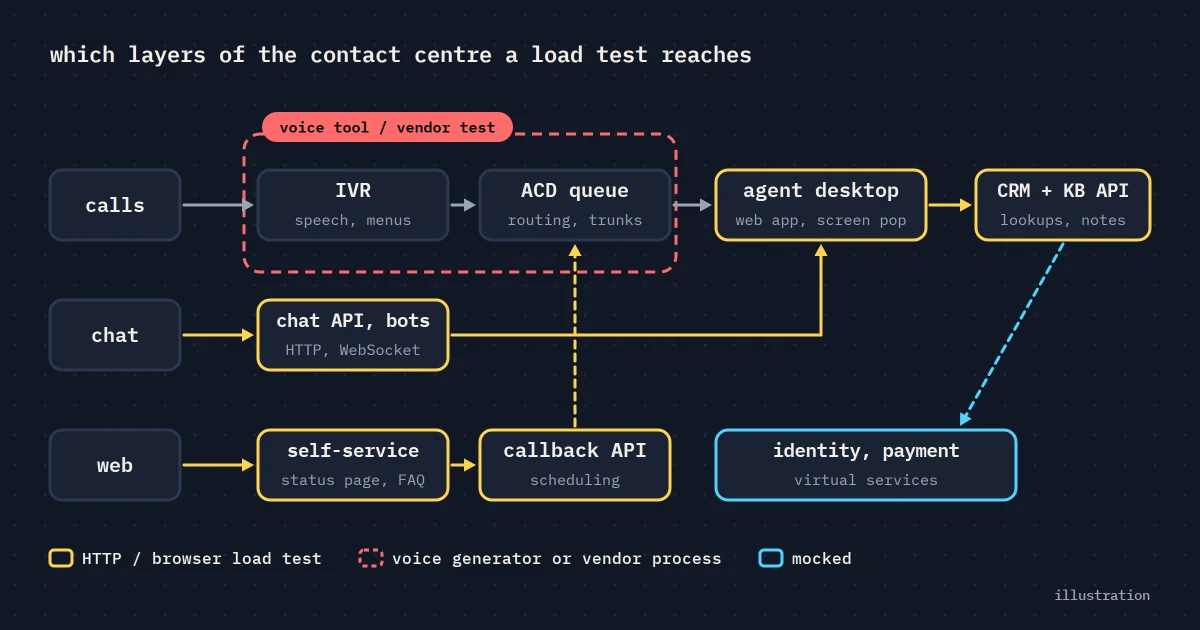
To load test a contact centre before a peak event, model the peak from your own interval history, then test each layer with the right tool. Web-facing layers (agent desktop, CRM and knowledge-base APIs, chat, self-service, callback booking) take HTTP and browser load. The voice layer (SIP trunks, IVR, queues) needs a voice generator or your vendor’s approved test process. Run baseline, peak, spike, soak and failover tests on a timeline that ends a week before the event, with abort rules agreed in advance.
A contact centre is a chain of telephony, routing, desktop software, data lookups and web channels, owned by different teams and vendors. A peak breaks the weakest link, which is often the one nobody tested.
Prerequisites
- Interval reports (15 or 30 minutes) and average handle time for a comparable event.
- A list of every component with a named owner.
- A test environment with production-scale synthetic customer data.
- Written approval from your carrier and CCaaS vendor for any synthetic voice or chat volume.
- An incident lead who signs off the abort criteria.
What counts as the contact centre
Draw the system before you plan the test. List every component a contact touches, from the first ring or page view to the closed record.
- Telephony. Carrier connections, SIP trunks and the concurrent-call limit each one carries.
- IVR and speech self-service. Menus, speech recognition, authentication prompts, and a payment IVR if you take card payments by phone.
- ACD routing and queues. Skills-based routing, queue priorities, overflow rules and callback offers.
- CTI. The link that tells the agent desktop which call is ringing and who the caller is.
- Agent desktop. Usually a web application. It opens the screen pop, loads customer history and saves notes.
- CRM and knowledge-base APIs. The lookups behind every screen pop and every search the agent runs mid-call.
- Chat, messaging and bots. Web chat, messaging apps and any bot that answers before a person does.
- Callback scheduling. The service that holds a caller’s place or books a time.
- Web self-service and status pages. The place people go when the phone queue is long.
- Identity and authentication. Single sign-on for agents, and verification services for customers.
- Third-party dependencies. Payment providers, address and carrier lookups, SMS and email gateways.
Model the peak from your own history
- Pull volumes per interval (15 or 30 minutes) for the same kind of event last year, or for your busiest comparable days. Include calls offered, chats started, web sessions and callback requests.
- Pull average handle time (AHT) per channel and per interval. AHT often rises on event days because the questions are harder.
- Find the shape. Many events have a sharp spike at the announcement minute (an email goes out, a bill lands, an outage notice is posted), then a long plateau.
- Scale it by the change you expect: customer count, marketing reach, the size of the incident.
Staffing and system capacity are separate questions, and mixing them hides problems. Staffing uses Erlang-style arithmetic. The offered load in Erlangs is the arrival rate per hour multiplied by AHT in seconds, divided by 3,600. If 900 calls per hour arrive with a 300-second AHT, the offered load is 75 Erlangs, so you need more than 75 agents on the phones, and the Erlang C formula tells you how many more to hit a service-level target. The formula assumes callers wait patiently and nobody retries, so treat its answer as a floor on a bad day.
System capacity is a different calculation. Concurrent calls in the system equal the arrival rate multiplied by the time each call spends in the IVR, the queue and the conversation (Little’s law). That number must fit inside your trunk channel count and your IVR port licence. Do the same sum for chats and web sessions.
Callers who get a busy signal or a dropped call ring again, so telephony sees more attempts than people. Take a retry factor from past events.
Decide what each tool tests
This is where plans go wrong. A load tool that speaks HTTP does not place a phone call.
Layers that take HTTP and browser load:
- The agent desktop, driven by real-browser tests that log in, take a screen pop and save notes.
- CRM and knowledge-base APIs, called directly at the rate the desktop produces.
- Chat and bot APIs, including WebSocket connections (WebSocket load testing).
- Web self-service, status pages and the callback booking API.
- Authentication endpoints and single sign-on.
Layers that need voice-layer testing:
- SIP signalling and RTP media, meaning actual call generation. Open-source SIP tools such as SIPp generate calls against your own telephony infrastructure. Cloud contact centre vendors often run their own capacity tests or require you to use their approved process.
- IVR speech recognition and call flows, which need audio, not HTTP.
Carriers and CCaaS vendors usually require advance notice and approval before synthetic call volume. Some treat unannounced volume as a denial-of-service attempt. Check your provider’s policy, get approval in writing, and agree a test window.
Test the overflow paths
When queues fill, callers move. Some hang up and open the website. Some request a callback. Some start a chat. The load you removed from the phones lands on your web self-service, your status page and your callback and chat APIs.
Test those paths at the volume the phone queue would push to them. A status page that falls over sends callers straight back to the phones. A load test tells you if yours holds.
Agent desktop concurrency
The desktop multiplies. Each answered contact triggers a screen pop, and each screen pop triggers a set of CRM and knowledge-base calls. The simple model is agents × contacts per agent per hour × calls per contact.
The burst case is worse than the average. When a long queue drains after an outage, or when a shift starts, many agents receive a call within seconds. Everyone logs in, loads the desktop and gets a screen pop in the same minute. Model the login storm and the queue-drain burst, not only the smooth average.
Use browser tests for the desktop because the page makes many background calls that a direct API script would miss. Use API tests for the CRM endpoints behind it when you need to push the rate higher than a browser fleet comfortably produces. See browser versus protocol load testing for choosing between them.
Test types for a peak
| Test | Question it answers |
|---|---|
| Baseline | What does a normal busy day look like today, and do the scripts work? |
| Peak | Does the system hold at the forecast plateau, with headroom? |
| Spike | What happens in the minutes after the announcement? (spike test lag) |
| Soak | Does it stay stable across a full day, including shift changes? |
| Failover | What happens when a trunk, a node or a dependency fails under load? |
Mock what you must not hit
Payment providers, identity vendors and SMS gateways are not yours to load. They rate-limit, charge per call, or treat the traffic as abuse. Replace them with doubles that behave like the real service on its worst reasonable day, with realistic latency and error rates. Third-party API mocks for load testing covers how to build them honestly.
Agree war-room and abort rules first
Decide before test day who stops a test and why. Write the thresholds down: an error rate over an agreed percentage for a set time, agent desktop response times past what agents work with, any sign that test traffic reached a real customer or a live third party. The incident lead signs them off. The structure in war-room and runbook applies directly. Swap the checkout rows for contact centre equivalents.
A numbered plan with a timeline
Adjust the dates to your event.
- T-8 weeks. Scope and approvals. Draw the system, name an owner for every component, and request approval from carriers and your CCaaS vendor for any voice testing.
- T-7 weeks. Model the peak. Build the interval model, the Erlang floor and the trunk and port sums. Get the numbers reviewed by workforce management.
- T-6 weeks. Environment and data. Confirm the test environment, load anonymised or synthetic customer records at production scale, and set up the mocks.
- T-5 weeks. Scripts and baseline. Build the desktop, CRM, chat, self-service and callback tests. Run baselines and record the numbers.
- T-4 weeks. First peak and voice tests. Run the plateau against the web layers. Run the approved voice test in its agreed window.
- T-3 weeks. Fix and retest. Triage findings, fix, rerun. Plan for more than one cycle.
- T-2 weeks. Spike and failover. Test the announcement minute and a deliberate failure.
- T-1 week. Dress rehearsal. One full-day soak with the war-room staffed and the runbook in use.
- T-2 days. Freeze. No risky changes. Confirm the standby rota and contact details.
- Event day. Watch the live dashboards against the amber and red thresholds you agreed.
- T+1 week. Debrief. Compare the real peak with the model and update it for next time.
The runbook turns these steps into a checklist and a criteria table. For the money side, see budgeting load testing for a peak season.
Worked example (hypothetical numbers)
These figures are invented to show the arithmetic. Replace them with yours.
A utility sends a billing-cycle email at 09:00. Last year’s matching event gave a normal busy hour of 900 calls with a 300-second AHT. The forecast for this year is 2.5 times that volume over the first hour, and half of it lands in the first 15 minutes.
- Plateau hour: 2,250 calls × 300 s ÷ 3,600 = 187.5 Erlangs. Staffing needs well over 188 agents on the phones, so the roster plans for 230.
- First 15 minutes: 1,125 calls arrive, a rate of 4,500 per hour. At 300 s AHT that is 375 Erlangs against a roster of 230, so a queue builds.
- Concurrent calls: if the average call spends 60 seconds in the IVR and queue before an agent plus 300 seconds talking, the system holds about 4,500 × 360 ÷ 3,600 = 450 calls at the spike. If the contract allows 400 trunk channels, callers get busy signals and ring again. Add a 20 percent retry factor and the offered load rises further.
- Desktop: 230 agents each finish 12 contacts an hour (3,600 ÷ 300), about 0.77 contacts a second across the floor. At 6 CRM and knowledge-base calls per contact that is roughly 4.6 requests a second on average. A queue drain that hands calls to 200 agents within 10 seconds produces about 120 requests a second. The burst is more than 25 times the average.
- Overflow: if 30 percent of the 1,125 spike callers give up and go to the website, that is about 340 extra sessions in 15 minutes on self-service and the status page, on top of the email click-through traffic.
The test plan follows from the numbers. The voice test targets 450 concurrent calls with retries, run by the carrier or a voice tool in an agreed window. The web tests drive a 120 requests-a-second CRM burst, a login storm for 230 desktops, and several hundred self-service sessions per minute.
Troubleshooting
- Busy signals start far below the target. The trunk channel count or IVR port licence is the limit. Check both against the concurrent-call sum before you blame routing.
- Agent desktop tests pass but real agents report slowness. The test lacks the login storm or the queue-drain burst. Add both.
- The status page holds in the test but fails in the event. The test ran without the email click-through traffic. Add that load on top of the overflow.
- Results look better than production. A mock answers faster than the real service does. Give it production-like latency and error rates.
- The vendor stops the test. The notice or approval was missing. Pause, agree a window in writing, and rerun.
Where MaxoPerf fits
MaxoPerf covers the web-facing and API layers. It does not generate voice or SIP traffic. The docs list no SIP support, so pair it with a voice tool or your vendor’s process for that layer.
- Agent desktop. Browser tests run Selenium or Playwright scripts with real browsers, with video, HAR and step capture, so you see the desktop slow down in the same place agents would.
- CRM, knowledge-base, chat and callback APIs. API tests use the load profile you model. The cookbook shows staged ramps and fixed request-rate tests.
- Third parties. Virtual services are running mocks with stable hostnames, and a test binds one as a dependency so the run starts it for you.
- Internal systems. A private Outpost generates load from inside your network, so CRM and desktop back ends do not need to face the internet. See private load generation for when that applies.
- Pass or fail. Failure criteria give every rehearsal a verdict, and run comparison shows whether the fix cycle helped.
- Repeatability. Scheduled runs keep a nightly baseline alive until the freeze.
For sizing the target itself, see load test capacity planning and the peak events academy section.
Questions this article answers
How do you load test a contact centre?
Split it into layers. Test the web-facing parts (agent desktop, CRM and knowledge-base APIs, chat, self-service, callback booking) with HTTP and browser load tools. Test the voice layer (SIP trunks, IVR, queues) with a voice generator or your platform vendor's approved test process. Drive both from a model of the peak built from historical interval data.
Do cloud contact centre providers allow load testing?
Only within your vendor's rules. Most CCaaS vendors and carriers require advance notice and written approval before synthetic call or chat volume, and some run the test for you. Check your provider's policy first, then focus your own tests on the systems you operate: integrations, CRM, desktop customisations and web self-service.
How many concurrent calls should I test for?
Take the forecast peak arrival rate per interval and multiply by the time each call spends in the system, including IVR, queue and talk time. That gives concurrent calls (Little's law). Add headroom for retries, because callers who hit a busy signal or a long queue ring again.
What should I do about third-party services during a contact centre load test?
Replace payment providers, identity checks, carrier lookups and SMS gateways with mocks that behave like the real service on a bad day. Real providers rate-limit, bill per call, or treat synthetic volume as abuse, so you should not send them test traffic without agreement.
When should a contact centre load test stop?
Write abort criteria before the test and have the incident lead sign them off. Typical triggers are an error rate above an agreed percentage for a set time, agent desktop latency past what agents work with, or any sign that the test is touching real customers or live third parties.