Turning Load-Test Results into a Capacity Plan
Turn a tested load point into a capacity plan with headroom, resource demand, scenario bounds, operational limits, and a clear decision.
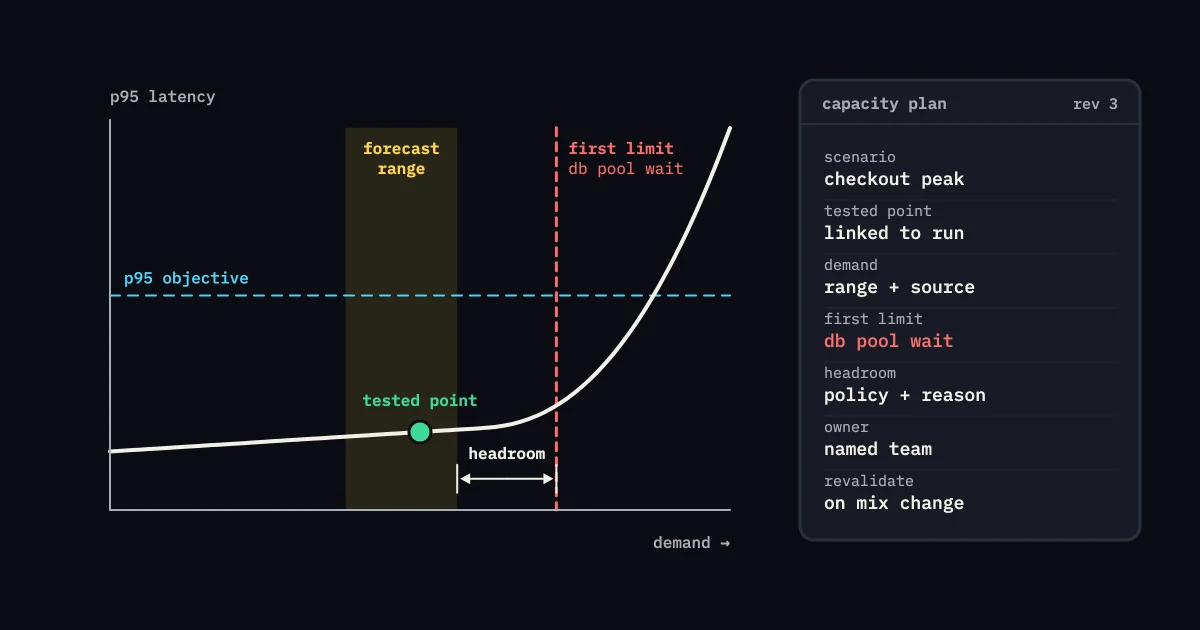
A load-test result is evidence from one workload, environment, resource shape, and time window. A capacity plan connects that evidence to demand, headroom, limits, operating actions, and uncertainty. It says what the team can support under named conditions, and what you must check before those conditions change.
Start with the decision: prepare for a launch, size a service, pick a scaling boundary, or confirm an operational limit. The decision tells you which measurements and assumptions matter.
Describe the tested point
Record the traffic mix, arrival or concurrency model, ramp, duration, data shape, cache state, environment, generator location, dependency conditions, and success criteria. Include throughput, operation-level percentiles, errors, resource signals, and worker health. A headline like “supports the target rate” means little without its workload definition.
The capacity-planning and modeling guide gives you a structure to follow. Treat the tested point as a bounded observation. Do not stretch it into an extrapolation that hides its assumptions.
Check that the target received the offered load. Retries, rate limits, client ceilings, or generator saturation can change the pressure. Compare intended, sent, accepted, completed, and retried work.
Translate demand into scenarios
Forecast demand as a range and say where it comes from. Model ordinary, peak, burst, and recovery shapes where they apply. Map demand to operations instead of one total request number. A new user may sign in once and read many times. A batch job may cause a short burst of writes.
Keep assumptions visible: active users, session length, geographic mix, payload size, cache state, and dependency behavior. If a forecast is uncertain, use scenarios to show what changes when the assumption moves. The Pokémon GO incident analysis discusses why you should not treat an estimate as a guarantee.
Do not add a dramatic multiplier without a reason. A higher scenario is useful when it tests a known uncertainty or a protective boundary. Being larger does not make it a prediction.
Choose headroom deliberately
Headroom is a policy for uncertainty and recovery. No single percentage fits every case. Weigh forecast error, deployment time, autoscaling delay, dependency limits, reconnect waves, and operator response. State why the margin you chose is enough for the decision and which signal would trigger a review.
In a safe environment, test behavior near the planned point and past it. Watch whether latency rises gradually, errors shed safely, queues grow, or a hard quota appears. A system that stays green until it collapses all at once needs a different operating plan from one that degrades slowly behind clear protection.
Include recovery headroom. A service may handle steady demand and still fail when rejected clients come back or a failed worker is replaced. Where it makes sense, run a bounded recovery wave and document the condition.
Connect resource demand to work
Record CPU, memory, network, connections, storage, pool wait, queue age, and dependency saturation by operation or service. Find out which signal moved first. A resource at 70% during one test does not prove a safe ceiling if tail latency or a downstream quota has already crossed its objective.
Tell application limits apart from generator limits. If a worker hits its ceiling, adding target capacity does not fix the test. If a database pool queues, more web workers may add waiting instead of useful throughput.
Resource demand can shift with data, cache, payload, and feature flags. Keep those dimensions in the plan and rerun when they change in a meaningful way.
Include operational limits
Quotas, connection limits, addresses, storage, partner rates, and deployment windows can limit capacity no matter how much compute you have. Name an owner and a mitigation for each. A quota increase may need lead time. Do not assume a partner can absorb a test just because your origin can.
Security controls and admission policy are part of the public path. Test approved edge behavior on its own, or with the full route when that is safe. Confirm that legitimate traffic gets through and that rejection stays bounded and visible.
Make the plan actionable
For each scenario, record the tested point, expected demand, observed limit, headroom policy, action, owner, and review trigger. Actions can include scaling, quota coordination, cache warm-up, feature degradation, queue sizing, or a new test. Keep the wording conditional when the evidence is conditional.
Link the capacity plan to the run artifacts and to the change or launch record. Include the date and environment version. Without traceable evidence, a plan turns into a stale number cut off from the workload it describes.
Revalidate change
Attach an explicit trigger to the next validation. A new traffic forecast, a change in data volume, a dependency limit, an architecture revision, or a sustained resource trend can invalidate a capacity boundary even when the application code has not changed. Keep the old result for history and state which assumption no longer holds. Keep the workload shape the same where you can, so the difference stays readable. If the shape has to change, explain why the new result is not a direct comparison. Name the owner who schedules the test and the evidence needed to close it. Capacity planning then stays an operating decision that gets updated, instead of a document that goes stale unnoticed. It also gives an incident review a starting point: the team can see which boundary was tested, which one changed, and which signal to watch until the new run is done.
Re-run when the traffic mix, query shape, architecture, region, dependency, or scaling policy changes. Compare runs with the same inputs where you can, and look at distributions as well as averages. The comparison guide covers baseline discipline.
After launch, watch production signals for the assumptions the test could not prove. If demand or resource behavior drifts from the model, update the model and pick a controlled experiment. A capacity plan is a decision record you keep current. It is not a certificate.
A good review fits on one page: scenario, tested point, demand range, first limit, headroom decision, recovery condition, owner, and revalidation trigger. Link every observed value to a run and mark every assumption as observed, supplied, or inferred. That format lets people challenge a plan without swapping its evidence for a new, untested number.
Say the tested point meets its latency objective, but a database pool is already close to its operating limit. The plan should record the pool as the first constraint, name the supported demand range, and require a pool or query experiment before traffic goes up. If the same point fails only during recovery, headroom has to cover reconnect behavior. Adding steady-state workers is not enough. Capacity planning is about the limiting condition that governs the decision.
Revisit the plan after a real change in traffic mix, data cardinality, region, scaling policy, or dependency. A stale result can still be numerically right for its old scenario and misleading for operations today. Keep the old plan, open a new comparison, and explain which assumption moved.
Keep an explicit “not covered” section for multi-region routing, failover, partner quotas, or browser behavior that the tested point did not exercise. That boundary stops anyone from reading the plan as a guarantee about a bigger system than the run observed.
List the next validation date or trigger next to that boundary. A plan is easier to maintain when a traffic forecast, architecture change, or dependency limit opens a new test automatically, instead of relying on someone to remember an old result.