Session Performance: Load Testing Logins, Session Stores, and Expiry
Session performance is the cost of creating, storing and expiring sessions. Test login cost, store memory and expiry waves with this plan.
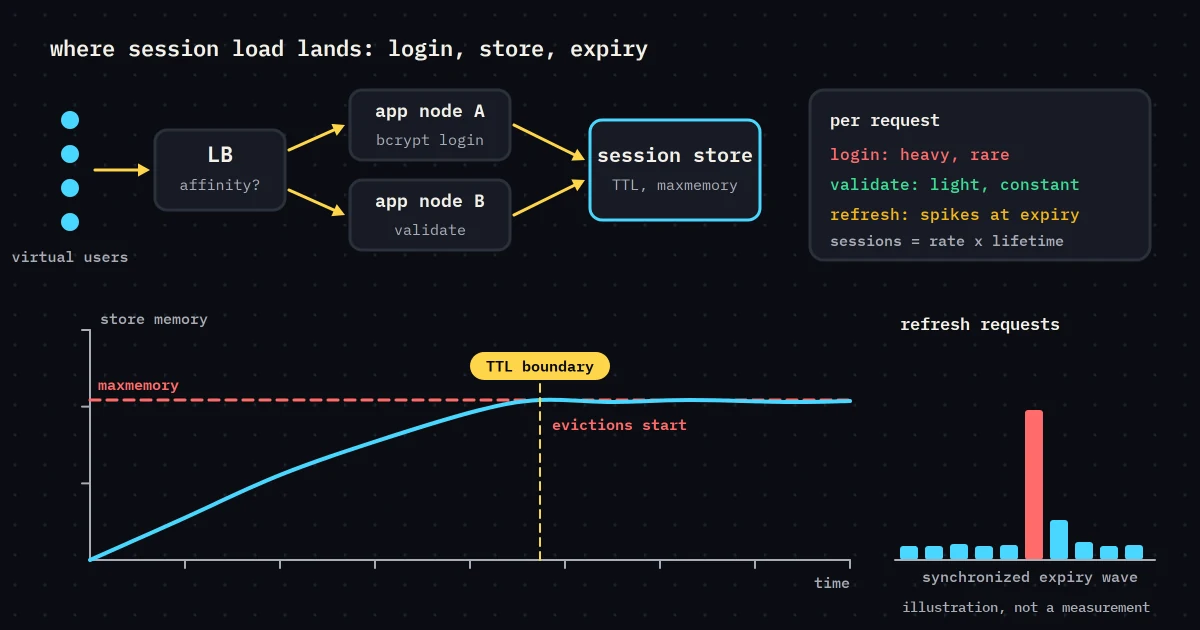
Session performance is the cost and speed of creating, validating, storing and expiring user sessions as concurrency grows. Three places fail first: the login request, the session store, and the moment many sessions expire together. This guide shows how to test each one. It extends the authentication and session safety guide with the capacity side.
Prerequisites
Gather these before you start.
- A test environment with a session store that matches production in type, memory limit and eviction policy.
- Synthetic accounts, one per virtual user. Never reuse real user credentials.
- Your numbers for session TTL, token lifetime, average session length and password hash work factor. Mark any guess as a guess.
- Metrics from the session store, the app nodes and the load balancer.
- A MaxoPerf project. The first test guide covers setup.
What session performance includes
A session has four costs. Each one scales differently.
- Creation. The login request. It checks credentials, hashes the password, calls an identity provider if you use SSO, and writes the session record.
- Validation. Work on every authenticated request. The server reads the cookie, then looks up the session or verifies a token signature.
- Storage. Memory and latency in Redis, memcached, a database table or process memory.
- Lifetime. How long a session lives. Lifetime sets how many sessions are alive at once, and when they die.
Creation is rare and heavy. Validation is light and constant. Storage grows with the product of both. A test that exercises one cost answers the wrong question.
Login is the most expensive request
Password hashes such as bcrypt and argon2 are slow on purpose. The work factor burns CPU so attackers guess slowly. The same cost lands on your servers at every sign-in. Raise the work factor and your login capacity drops. SSO adds identity provider round trips and rate limits that belong to a third party.
A script that logs in on every iteration turns a rare request into the main workload. A healthy system then looks CPU bound. Real traffic is mostly authenticated requests that reuse a session. Measure login in its own scenario at a realistic arrival rate. Keep that scenario away from services you do not own.
Hypothetical arithmetic: a hash costs 250 ms of CPU on one core. Five logins per second use about 1.25 cores before any business logic runs.
Session stores and how they fail
Server-side sessions live in a store. Four failure modes appear at volume.
- Memory growth. Memory equals session count times serialized size. An abandoned session stays until its TTL ends. Users who close the tab without logging out keep costing memory. A session that collects cart items, permissions and profile data grows far past the cookie size.
- Eviction. When the store hits its memory limit, the eviction policy deletes keys. Live sessions vanish. Users see a logout. Your app sees a burst of 401s and re-logins, which adds login load at the worst moment.
- Hot keys. One shared test account sends every virtual user to a single key. Large values add serialization time to each read and write. Frameworks that save the session on every response write once per request.
- Latency. A 2 ms lookup sits in front of every call. Watch store p95 and p99, plus connection pool waits on the app side.
JWT or server sessions
A signed token moves validation to the app node. The node verifies the signature and checks the expiry. No store round trip happens per request. The costs move elsewhere.
- Revocation. Banning a user before expiry needs a denylist lookup or a short lifetime. A denylist is a store again.
- Refresh traffic. Short-lived access tokens need regular refresh calls. Each refresh hits a database or the identity provider.
- Token size. Large claims inflate every request header.
- Synchronized expiry. Tokens issued together expire together.
Server sessions give you easy revocation and small cookies. They cost a store you must size and keep available. Test the model you run, including its revocation and refresh paths.
Expiry waves and refresh storms
Load tests start every virtual user inside one ramp. Say the access token lasts 15 minutes and the ramp took 30 seconds. Fifteen minutes later, most clients refresh within the same half minute. A real population arrives over hours and spreads the refreshes out. A careless test squeezes them into a spike.
Choose on purpose. If the wave happens in production, test it. Deployments that force re-login, mass revocations and shift starts all create one. If not, stagger arrivals and add jitter. Label which model you ran.
Affinity and uneven nodes
Sticky sessions pin a user to the node that created the session. Two problems follow under load. Nodes drift apart when long sessions pile onto one of them. See why a load balancer distributes unevenly. And when a node dies or restarts during a deploy, every session it held is lost. Those users log in again together.
Compare per-node CPU and active session counts during the run. Then remove a node and watch the re-login burst hit your login path.
Session length sets concurrency
You do not pick the number of concurrent sessions. Little’s law sets it: active sessions equal the arrival rate of new sessions times the time each stays alive. Think time and pacing decide how long each virtual user stays. Add the idle TTL. An abandoned session lives for its active time plus the TTL after its last request.
Test plan
- Write down the model. Record new sessions per second, mean session length, idle TTL, token lifetime, serialized session size and the store memory limit.
- Test login alone. Use an arrival rate, not a virtual user loop. Raise the rate until login p95 or CPU crosses your objective. Record that rate.
- Log in once per virtual user. Capture the cookie or token and reuse it for the whole journey. Pace requests with realistic think time. Use correlation for dynamic values. Give each user its own account.
- Soak across TTL boundaries. Run for the idle TTL plus the token lifetime plus a margin. A ten minute run shows no eviction and no expiry.
- Add an expiry wave if production has one. Otherwise stagger and add jitter.
- Kill a node mid-run if you use affinity. Record login rate, error rate and recovery time.
- Compare the store to the model. Check that active sessions and memory match your step 1 prediction.
This k6 fragment shows step 3. Each virtual user logs in on its first iteration. Its cookie jar carries the session afterwards.
import http from 'k6/http';import { check, sleep } from 'k6';import { SharedArray } from 'k6/data';
const users = new SharedArray('users', () => JSON.parse(open('./users.json')));let loggedIn = false;
export default function () {  const user = users[(__VU - 1) % users.length];  if (!loggedIn) {    const res = http.post(`${__ENV.BASE_URL}/auth/login`, JSON.stringify({      email: user.email,      password: __ENV.SECRET_LOADTEST_PASSWORD,    }), { headers: { 'Content-Type': 'application/json' } });    check(res, { 'login ok': (r) => r.status === 200 });    loggedIn = true; // the cookie jar keeps the session for this VU  }  http.get(`${__ENV.BASE_URL}/api/orders`);  sleep(5 + Math.random() * 10);}
On a 401, log in again and count it as an event. A silent re-login hides the eviction problem you are testing for.
Metrics to watch
| Signal | Why it matters |
|---|---|
| Login p95 and CPU on auth nodes | Hashing cost and identity provider latency |
| Session store memory and key count | Growth against your model |
| Store evictions and expired keys | Evictions force logouts |
| Store p95 and p99 latency, pool waits | Added to every request |
| 401 and re-login rate | Expiry and eviction in action |
| Refresh request rate and errors | Synchronized expiry |
| Per-node request share and CPU | Affinity skew |
Worked example with hypothetical numbers
These figures are invented to show the arithmetic. They are not measurements. A store has a 512 MB memory limit and a 30 minute idle TTL. Users arrive at 5 new sessions per second and stay 20 minutes. Each serialized session is 50 KB.
Little’s law gives 5 times 1,200 seconds, or 6,000 active sessions. At 50 KB each, that is about 300 MB. The store fits.
Now assume users never log out. Each session lives 30 minutes past its last request. Lifetime becomes about 3,000 seconds. The store holds about 15,000 sessions, or 750 MB. The 512 MB limit falls at about 10,000 sessions, roughly 33 minutes in, and evictions start. A ten minute test shows nothing. A 60 minute soak shows memory climbing, evictions appearing, and 401s followed by re-login bursts that raise login CPU.
Now put all 6,000 users in a 30 second ramp with 15 minute tokens. The refresh rate at expiry is about 200 per second. A population spread over 20 minutes refreshes at 5 per second. The test gives you the worst case. Compare it with your refresh endpoint capacity.
Run it in MaxoPerf
Store the login password in project secrets and bind it to the test as a SECRET_ environment variable. Nothing sensitive then sits in the script. Build a dataset of synthetic accounts from a CSV and bind it to the test, as described in how to use test data. The auth login and token capture cookbook shows how to extract a token from the login response and send it on later requests. The CSV data-driven recipe covers per-user data. Follow the overnight soak test recipe for the long duration. Read store and node metrics from your own monitoring beside the run results.
Troubleshooting
- Login p95 is high from the first minute. The hash work factor or an identity provider is the limit. Run the login scenario alone and read auth node CPU. Lower the arrival rate, or stub the identity provider.
- Every user gets a 401 after login. The cookie or token is not reaching later requests. Check the correlation step and the cookie domain. Print one response header from a single user.
- Memory never reaches the model. The run is shorter than the TTL, or the app deletes sessions on logout. Extend the soak past the idle TTL.
- Refresh errors spike at one minute mark. Every user logged in during the same ramp. Stagger arrivals with jitter, or label the run as an expiry wave test.
- One node carries most of the load. Affinity pins long sessions to it. Compare per-node session counts and read the load balancer algorithm.
- Evictions appear but memory looks low. The store limit is lower than you assumed, or a hot key is large. Read the store config and the largest keys.
Questions this article answers
What does session performance mean?
Session performance is how fast and how cheaply your system creates, validates, stores and expires user sessions as concurrency grows. The parts are login cost, per-request session lookup, session store latency and memory, and session lifetime. A session problem shows up as slow logins, random logouts, or a store that runs out of memory.
How do you load test user sessions?
Log each virtual user in once, keep its cookie or token, and reuse it for the whole journey. Run long enough to cross the session TTL. Then check store memory, evictions, refresh traffic and error rates. Test login capacity in a separate scenario with its own arrival rate.
Are JWTs faster than server-side sessions under load?
A JWT removes the store lookup, so validation is a signature check on the app node. You pay elsewhere. Revocation needs a lookup or a short lifetime, and short lifetimes create refresh traffic. Neither model wins in general, so test the one you run, including expiry.
Why do users get logged out when load goes up?
Three causes dominate. The session store evicts keys under memory pressure. A node dies and takes its pinned sessions with it. Tokens expire in one wave and the refresh endpoint fails. Check eviction metrics and refresh error rates first.