Think Time, Pacing, and Session Length: Making Virtual Users Behave Like People
Separate think time from pacing and session length so virtual-user concurrency and throughput remain explainable in load tests.
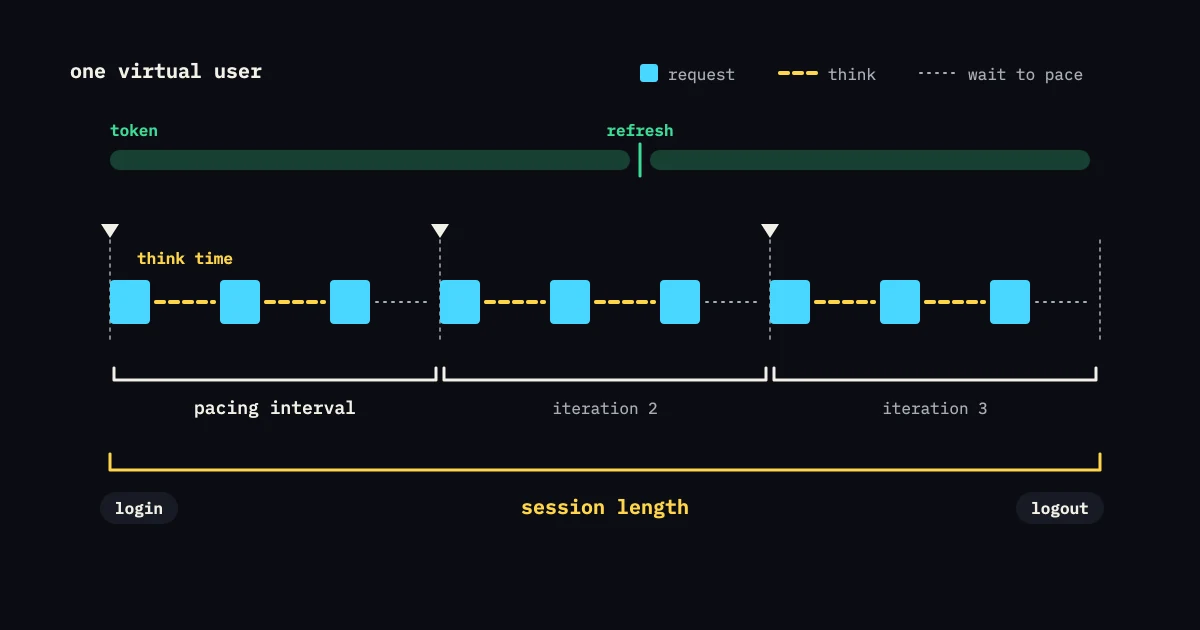
“Add a delay” is not a workload model. Think time, pacing, and session length describe different behavior. Think time is a pause between user actions. Pacing is the intended interval between iterations or transactions. Session length is how long an actor stays active. Keep them separate and you can explain your concurrency and throughput.
Think time follows an action
A person may pause after reading search results, before opening a detail page, or while checking a confirmation. Put the pause at the journey step where it happens. One delay at the end changes the rate but not how the sequence presses on each dependency.
Use a distribution when you have evidence for one: some users act quickly, others pause longer. If the value is a guess, label it and test how sensitive the result is to it. Do not present a fixed five-second sleep as measured human behavior.
Pacing controls cycles
Pacing sets how often a transaction or complete journey starts. A journey can contain 15 seconds of actions and think time inside a 60-second business cycle. Without pacing, a virtual user may start over at once and create a rate far above the intended model.
Implement pacing with a visible timer and record the iteration rate you achieve. If responses slow past the pacing interval, decide whether the next iteration starts late, overlaps, or is dropped. That choice changes the workload, so do not hide it in a helper.
Session length changes state
Long sessions hold cookies, tokens, connections, carts, subscriptions, and server-side state. Short sessions put the weight on login and setup. Choose a mix that fits the question. A test where every actor logs in once may under-test token refresh. A test with one endless session may never exercise reauthentication.
As a hypothetical mix, 70 percent of actors could have 10-minute sessions with several reads, while 30 percent have 30-minute sessions and one write. These percentages are illustrations. State your source or assumption, and watch memory, connection pools, and session-store growth.
Keep the arithmetic visible
Say a closed actor spends 8 seconds on actions, 12 seconds thinking, and 40 seconds pacing between complete iterations. The cycle is not simply “one request every 40 seconds.” You have to define whether pacing includes the action time. Write the formula down and measure the observed cycle time. Use open and closed workload models to decide whether a slowdown should reduce arrivals.
Little’s Law can sanity-check the average relationship between throughput, time, and active work. It cannot choose a think-time distribution for you. The Little’s Law guide covers where it applies and which units to use.
Avoid two opposite mistakes
No think time creates a stress loop. That can be valid for an API producer, but it is not a human journey. Too much fixed think time makes the test so quiet that the target looks healthy because it receives little work. Both are useful scenarios when labeled. Neither is automatically realistic.
Do not add client delays to make up for a wrong arrival target. If production demand is an independent stream, use an arrival model and put human-like pauses only where the flow needs them. If the active population is what stays fixed, use VUs and document how the pauses affect throughput.
Validate with a small run
Run one actor and read the timestamps. Then run a small cohort and compare the iteration distribution, active sessions, requests per journey, and achieved arrivals with the plan. Confirm that token refresh, cleanup, and asynchronous polling happen as often as you intended.
Store pacing and session scenarios as named artifacts. The lasting practice is conceptual: think time models behavior between actions, pacing models cycle frequency, and session length models state lifetime. Name each one, then test how they interact on purpose.
Diagnose a rate mismatch
Say a plan calls for 100 active users and 10 iterations per second, and the run achieves 4. First check action time and think time. Then check whether pacing covers the full cycle or only the pause. Next, verify data and generator health. Do not add users until the timestamps explain the gap, or the extra population may multiply the mistake.
For a long session, record refresh and reconnect timing separately from business iterations. A user can stay active while sending no request, or send background heartbeats that are not a journey. Include those calls only when they are part of the system risk. Clear labels make session state useful instead of decorative.
Review the session model with product analytics or support when you can. Their evidence can separate a pause caused by reading from one caused by a slow page. If you cannot get that distinction, keep fast-pause and slow-pause scenarios and describe the uncertainty. The test stays useful as long as it says which behavior it represents.
Before you accept the model, look at timestamp samples from the beginning, middle, and end of a session. Confirm pacing does not overlap unexpectedly, refreshes are not counted as business journeys, and cleanup runs after both success and timeout. Keep those checks with the scenario so a later change cannot turn human-like pauses into a tight stress loop.
Treat time as part of the workload
Think time changes both concurrency and arrival rate. If a journey’s request sequence takes two seconds and the user pauses for eight seconds before starting again, that user cannot produce the pressure of a tight loop. Write down whether a pause comes before the first action, between actions, after a response, or after an error. A pause on the wrong boundary can look realistic in code and still send an unrealistic request pattern on the wire.
Use distributions instead of one universal sleep when the question is about user behavior. A short browse pause, a longer reading pause, and a timeout pause represent different states. Keep the distribution bounded and reproducible, with a seed or a recorded schedule, so you can compare two runs. Do not add random delay to hide a generator bottleneck. First prove that the generator can produce the intended rate with pauses turned off and with a control journey.
Session length also controls how long resources are held. A long-lived user may hold a cookie, connection, server-side cart, or stream while sending few requests. A short session may create more logins and more cleanup work. Measure active sessions separately from iterations and requests, and watch memory, connection pools, cache keys, and abandoned state. If a session ends after a failed step, assert that its synthetic state is released. A latency result with no retention result can miss the failure that shows up only after an hour.
When you are unsure of the real distribution, compare at least two models: a fast-interaction profile and a slower-reading profile at the same user count, or the same journey at a fixed arrival rate. If capacity changes a lot between them, report the sensitivity and choose the model that fits the decision you are making. A release gate should not quietly switch from concurrent users to arrival rate because the shorter model is easier to schedule.
At teardown, wait for expected asynchronous work, then verify it has drained. Check that reconnects do not count a session twice, that background refreshes stop after logout, and that expired state is not kept forever. These checks give pacing and session length an operational meaning, instead of leaving them as cosmetic realism on top of a request loop.
Keep the chosen distribution next to the result, so later readers can tell a behavioral change from an infrastructure change.