Seven Signs Your Load-Testing Setup Will Not Scale With Your Team
Seven practical warning signs that a load-testing setup is becoming fragile, from laptop-only scripts to unsafe targets and inaccessible results.
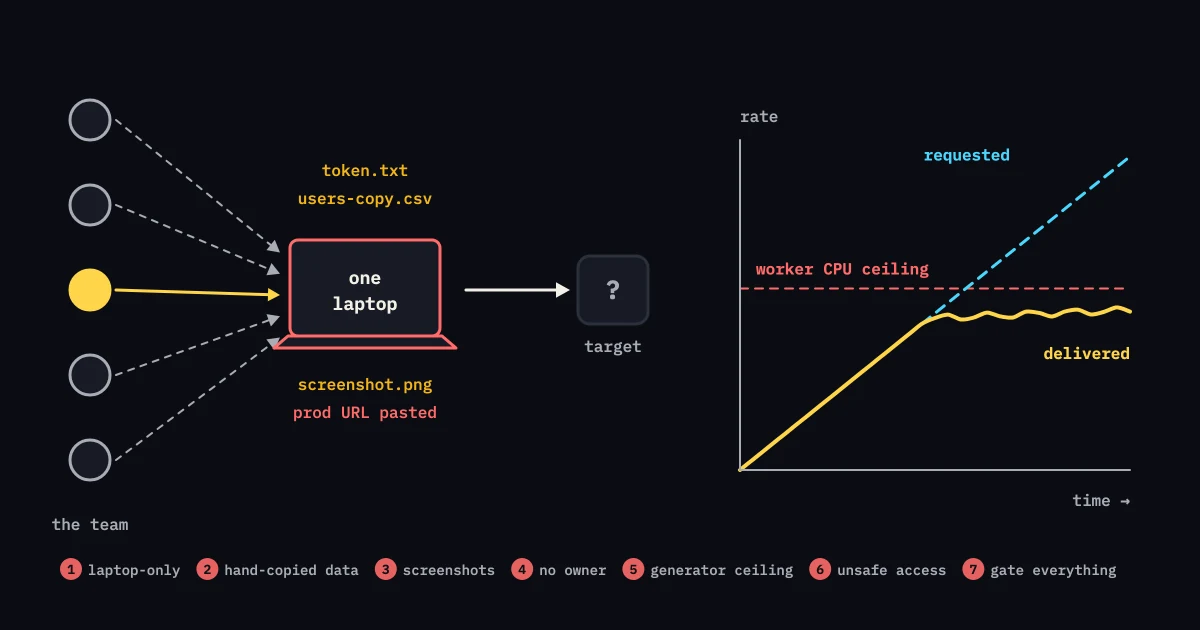
A load-testing setup can work for one engineer and still fail as a team system. The warning signs are usually operational. Scripts live on laptops. Data is copied by hand. Results cannot be compared. Nobody knows who owns a failure. Generators hit a ceiling. Target access depends on a risky shortcut. None of these signs points to one vendor or architecture. Each one names a decision your team has to make before growth turns the test into a ritual.
Treat the seven signs as prompts. A sign is evidence of a design gap. It does not prove that a replacement tool will close it. Start with the smallest safe improvement and measure whether the workflow gets more repeatable.
1. Only one laptop can run the test
If a script depends on a local path, a click sequence, a secret, an engine version, or an undocumented property, one person is the control plane. Other engineers cannot reproduce a result, and every run escalates to the author.
Move the definition, command, safe configuration, fixtures, assertions, and cleanup into a versioned artifact. Keep credentials out of it and make required values explicit. The laptop-to-team guide describes a gradual migration.
Test from a clean checkout. If the result changes, record which hidden assumption caused it. Do not call a laptop-only run a team baseline.
2. Test data is copied by hand
Hand-copied tokens, IDs, CSVs, and browser sessions cause collisions and stale state. A test can look healthy while every user reads the same warm record or sends an expired credential. Cleanup often gets skipped because nobody owns the data lifecycle.
Define fixture setup, namespaces, actor scope, correlation, expiry, and cleanup. Use bounded generated cases with a seed or a name. Fail loudly when a dynamic value is missing. The correlation guide gives practical checks.
Treat data access as a security boundary. Redact logs, and never put live secrets in a shared plan to make a demo easier.
3. Every result is a screenshot
A screenshot can start a conversation. It cannot preserve the workload, environment, labels, errors, or generator health. Without those fields, the team cannot tell whether a changed number is a regression, a different fixture, or a saturated worker.
Keep a durable report with run identity, commit, scenario, location, traffic shape, percentiles, throughput, assertions, error segments, and resource context. Link live dashboards, but do not use their changeable default window as the evidence. The report and telemetry guidance covers how to keep the two apart.
Require a short decision note: pass, fail, investigate, or incomplete, with the next action and an owner.
4. Nobody owns the failing operation
When a test fails and nobody owns the diagnosis, people rerun it again and again. “Performance” becomes everyone’s concern and nobody’s job. The team ends up with a growing pile of thresholds that nobody trusts.
Name a service owner, a platform owner, a QA or quality reviewer, and an operational reviewer for each test tier. Assign follow-up work to a specific operation and hypothesis, not to a vague project. Who owns performance testing? suggests a split that works.
Ownership does not mean one group does everything. It means the next action and the decision authority are visible.
5. The generator reaches its ceiling first
If a worker saturates CPU, memory, connections, file descriptors, or network, it may deliver less pressure than you asked for. The target can then look healthy because it got less work, or slow because client overhead became part of the measured path.
Monitor intended versus actual rate, and include worker health in the pass criteria. Add workers or change the execution model only in ways that keep the workload the same. A distributed design should make shard assignment, missing workers, result backpressure, and shutdown observable. See distributed load-test architecture.
Do not report a generator limit as an application capacity result.
6. Target access is an unsafe shortcut
If anyone can paste a production URL into a script and start traffic, the setup has a safety problem. If a private target is only reachable through an undocumented tunnel, the result has a reproducibility problem. Either one can cause incidents or invalid comparisons.
Use approved target allowlists, identity, network routes, certificates, secrets, and stop controls. Make a missing or denied configuration fail before any traffic starts. The platform buyer checklist lists access and isolation questions that apply to internal tooling as well.
Document who approves public or partner-facing exercises, and how the team proves cleanup afterward.
7. Every test is a release gate
An immature setup often tries to earn credibility by blocking releases on every number it produces. Noisy environments, shifting fixtures, and unclear criteria cause random failures. People learn to rerun or bypass the gate, and the setup loses its signal.
Start with an advisory smoke and make the workload and environment consistent. Promote a check to a gate only once its failure criteria, artifact, owner, and recovery path are understood. Deterministic CI checks explains why a gate should be bounded and honest about what it cannot prove.
Keep exploratory capacity runs, resilience runs, and scheduled baselines apart from pull-request feedback.
A better scale test
Run a scale-readiness exercise on the testing process itself. Ask a second engineer to run the scenario from a clean checkout, use a separate fixture namespace, confirm the target boundary, and find the result without the author’s help. Add one controlled worker or data change and see whether the setup still makes sense. Check that stopping a run leaves a bounded artifact and that cleanup is explicit. The exercise should show you the next bottleneck in the practice: credential handling, environment drift, generator capacity, unclear ownership, or evidence retention. Fix one seam, repeat the same exercise, and keep the before-and-after assumptions visible. That measures scale more honestly than adding virtual users to a fragile script. A team is ready to grow when the workflow stays safe and diagnosable as people, scenarios, and environments change.
Pick one sign and make a small improvement: move one script into version control, seed one fixture, keep one report, or add worker health to one result. Have another engineer run it from a clean environment. Compare the setup, diagnosis, and cleanup experience as well as the target metric.
Then expand carefully. Add private route validation, cancellation, result retention, and ownership as the workflow earns them. Revisit the design when protocols, locations, data sensitivity, or team size change.
The practical question is whether more engineers can safely run, understand, compare, and act on the results tomorrow. Producing traffic today is the easy part. Laptop-only dependencies, hand-managed data, screenshot evidence, ownership gaps, generator ceilings, unsafe access, and premature gates all tell you the operating model needs work. Fix them in small, verified steps and keep the evidence honest.
Use the first failing sign as a design exercise. Ask another engineer to run the scenario from a clean checkout, use a new fixture namespace, read the operation-level report, cancel the run, and name the owner of the next experiment. Every moment that needs a private credential, an undocumented click, a missing dashboard, or a specialist’s explanation is evidence. Fix the narrowest gap, rerun the exercise, and only then widen the suite.
Track the improvement with the same evidence you expect from a load run: setup path, target safety, fixture state, worker health, result link, and cleanup. If a fix makes things more convenient but weakens diagnosis or access control, it does not improve scale. Keep the tradeoff visible and pick the next bounded experiment.