Performance Testing Platform Buyer’s Checklist
A neutral buyer’s checklist for performance-testing evidence, protocols, locations, isolation, limits, security, collaboration, and exit.
Buying a performance-testing platform is a workflow decision. The longest feature list does not settle it. The right choice depends on the evidence your team needs, the protocols it tests, where targets live, how much infrastructure it can run, and what has to happen when a run fails. Start your evaluation from those constraints and test them with a representative scenario.
This checklist is vendor-neutral on purpose. Use it to write requirements, run a proof of value, and record what is still unproven. A platform should earn its place by making meaningful tests safer and easier to understand. A bigger dashboard is not a reason to give it one.
1. Define the workload you need to run
List the HTTP APIs, browser journeys, GraphQL, gRPC, WebSocket, queues, or other protocols that are in scope. Record authentication, correlation, payloads, streaming, connection reuse, data setup, and expected assertions. If a product cannot represent your workload without a custom workaround, that is a serious constraint.
Keep protocol pressure and browser experience apart. A browser runner and an API engine answer different questions and scale at different costs. The recording versus scripting guide helps you see what a recorded journey contains.
2. Require evidence, not a screenshot
Ask how the platform keeps operation labels, percentiles, error classes, assertions, throughput, generator health, and resource context. Can a reviewer compare two runs with their workload and environment metadata? Can they see partial or invalid runs? Can raw diagnostics be bounded and redacted?
Define the report a release owner needs before you pick a chart. The load-test result guide works as an evidence inventory. A platform that offers only an overall average may look good in a demo and fall short during diagnosis.
3. Verify locations and network boundaries
Map where targets and dependencies run, then check where generators can run. Check private routing, egress, DNS, certificates, regional options, and access controls. If a platform cannot reach a permitted private target, it does not fit that workload. If it reaches the target through an unclear path, you have a security review on your hands.
Ask how locations show up in results and how a test gets stopped. The private load-generation guide covers the boundary questions to ask. Get the provider’s support scope and the customer’s responsibilities in writing.
4. Test isolation and safety
Ask how projects, users, credentials, data, target allowlists, and run artifacts are kept apart. Check that a test cannot point at a live customer endpoint by accident or show one team’s result to another. Check audit events, least-privilege roles, retention, deletion, and secret handling.
In a safe environment, run a target configuration that is invalid on purpose. Confirm that it fails before traffic starts and leaves a useful, bounded record. Security belongs in performance tooling because a test that is easy to start is also easy to aim at the wrong place.
5. Understand limits and lifecycle
Ask for documented limits on workers, users, arrival rate, connections, duration, payload size, result retention, concurrent runs, and API calls. Ask what happens at each limit: reject, queue, throttle, or run partially. A limit is fine when it is visible and fits the workload. It is a risk when it is implicit.
Test cancellation, worker loss, result backpressure, and graceful completion. A platform must not report a pass when a worker or result shard disappeared. The distributed architecture questions in this guide make a practical rehearsal.
6. Inspect automation boundaries
Check the API, CLI, repository integration, environment configuration, webhooks, and CI behavior. Ask if you can version test definitions and thresholds, and if you can link a run to a commit without copying secrets into a pipeline log.
If the vendor promises both paths, run the same scenario from a clean checkout and through the UI. Compare expanded configuration, labels, assertions, and artifacts. A polished UI should not be the only way to start a test.
7. Evaluate collaboration and access
Who can create, run, review, cancel, and delete tests? Can a developer find a failed operation without a specialist’s help? Do comments, run links, ownership, and retention fit your review process? Collaboration features only help when they keep evidence and permission boundaries intact.
Ask how shared fixtures and credentials are managed. A team workflow has to make safe data easier than pasting a token into a script. Check redaction in logs, exports, notifications, and failure details.
8. Price the complete workflow
Ask for the pricing dimensions: generator time, concurrency, traffic, browser minutes, storage, users, locations, support, private networking, and overages. Ask what a realistic test includes, not a trivial example. Measure the operational work your team keeps: data setup, dashboards, upgrades, access reviews, and incident response.
A lower line-item price does not guarantee a lower total cost, and you cannot claim savings without data from your own workload. Compare the full operating model and write down the uncertain variables.
9. Plan exit and portability
Ask how to export test definitions, results, metadata, and data assumptions. Find out whether scenarios depend on proprietary syntax or can be reproduced with an underlying engine. A practical exit plan reduces lock-in risk even when you expect a long relationship.
During the evaluation, run a small export and a re-import or direct reproduction. Check that correlation, assertions, pacing, and labels survive. If they do not, record the migration cost as a decision factor. Do not hide it.
Run a bounded evaluation
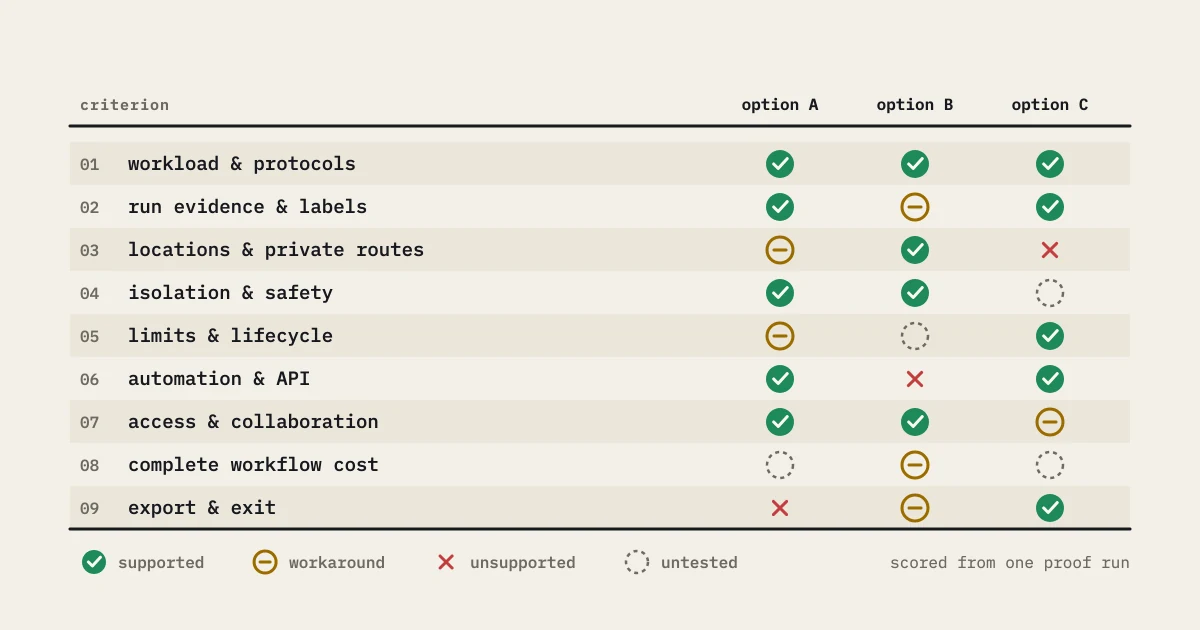
Turn the checklist into a bounded proof exercise with a known workload and a written exit condition. Ask the candidate to demonstrate the protocol, target boundary, credential handling, result evidence, and cleanup path your team needs. Record what worked, what needed a workaround, and what stayed unverified. Include a reviewer who did not build the scenario, so usability and operational clarity get the same scrutiny as feature coverage. Give no points for capabilities you cannot exercise safely in your environment. A scorecard helps when each answer links to a run, an artifact, or an explicit limitation. It misleads when every answer is a marketing adjective. Keep the rejected options in the final decision along with the reason each one failed the scenario, because those constraints tend to come back when the team changes traffic shape or ownership.
Pick one meaningful API or protocol journey, one data case, one failure assertion, and one private or constrained target if that applies. Run a smoke, a controlled load, and a cancellation or partial-result case. Review the evidence with the engineers and operators who will own it.
Score each finding as supported, unsupported, workaround, or untested. Keep the criteria visible, and give no points for a feature that did not answer your workload. Then make a decision that reflects the evidence and the responsibilities your team is willing to take on.
For a procurement review, ask each stakeholder for one non-negotiable and one failure they need to be able to diagnose. The author may need correlation and versioned tests. The operator may need worker health and cancellation. Security may need private routing and audit. The release owner may need comparable evidence. Turn those answers into the proof scenario, and record where the platform meets the need, misses it, or needs a workaround.
For example, a platform may support the HTTP script you want and still lack a clear path for private target access, partial-run evidence, or secure dynamic credentials. If those gaps affect the test’s safety or meaning, they are not minor dashboard issues. Mark the capability as a constraint, ask for a bounded demonstration, and put the result in the decision record. A feature counts as verified only when it works for the scenario your team will own.