Recording vs Scripting a Load Test: Where Recorded Journeys Break Down
Use recording for discovery, then turn the journey into a durable load test with data, correlation, assertions, pacing, and control.
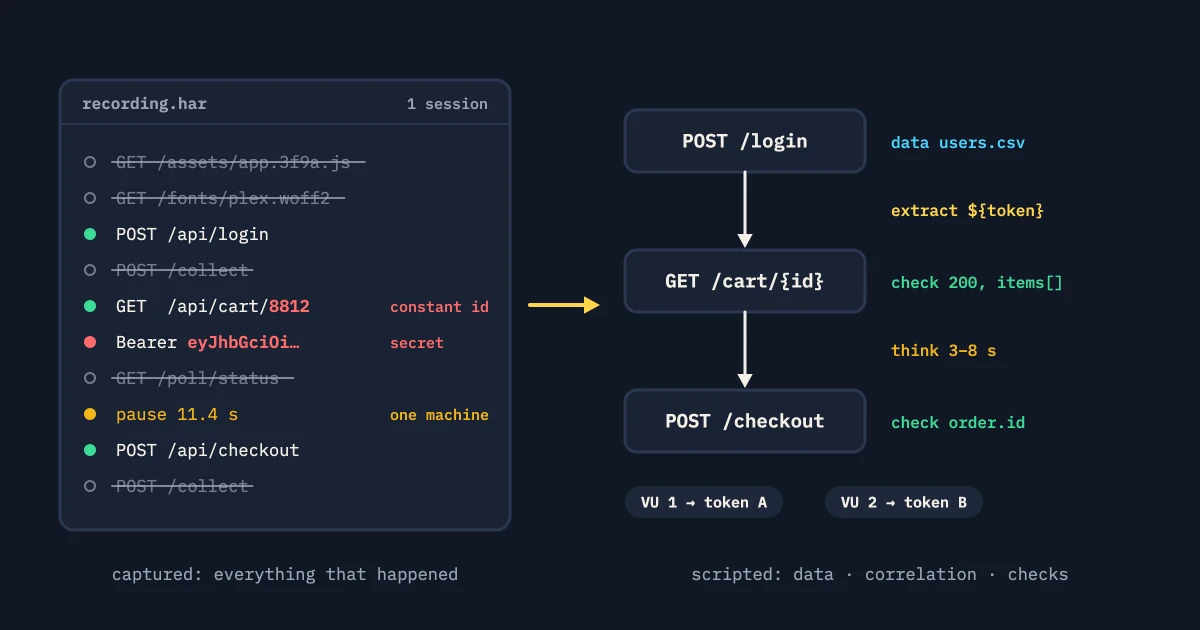
Recording a user journey is a good start. It captures requests, headers, assets, and ordering that you might forget when writing by hand. It does not give you a finished load test. Recorded journeys often carry hard-coded tokens, personal data, browser noise, unstable identifiers, and no assertions, plus timing that reflects one person’s machine instead of a traffic model.
Use recording for discovery and scripting for intent. The durable test should say what behavior it models, which data varies, how values move between requests, what success means, and how it applies pressure.
Use recording to learn the protocol
Record a safe, authorized journey with synthetic or redacted data. Read the network sequence and find the calls that carry user meaning. Separate application requests from static assets, analytics, polling, and browser background traffic, unless the test question explicitly includes them.
Capture the context: actor, environment, feature flags, cache state, and journey outcome. If the account already had setup data when you recorded, the recording may skip the creation and authorization steps a new user needs.
The realistic-load guide shows how to turn observations into a workload model. “Everything the browser requested” is not the same as “everything the customer experience needs.”
Remove secrets and personal data
Treat a recording as sensitive. Tokens, cookies, identifiers, form values, and response bodies can be in it even when the screen looked anonymous. Redact or replace them before you commit anything, and keep credentials out of the test artifact.
Use a dedicated account and fixture namespace. Document expiry and cleanup. If you cannot share a recording safely, copy its structure by hand into a new script instead of committing the raw artifact to a repository.
Check headers and query parameters for environment-specific values. A recording that points at a developer machine or a live customer route is unsafe, and you often cannot reproduce it.
Replace constants with data
Find the values that vary per user or run: access tokens, CSRF values, object IDs, timestamps, cursors, signed URLs, and search terms. Generate or seed them on purpose. A constant identifier can make a test look fast because it reads one warm object again and again, or it can cause collisions on a write path.
Use bounded fixture distributions and a reproducible case. Shared read-only data may be fine. Mutable resources need an owner and cleanup. The correlation guide explains how to extract, validate, and scope dynamic values.
Fail before dependent traffic when an extraction is missing or malformed. An empty variable that produces a fast error tells you nothing about the endpoint’s capacity.
Add assertions for meaning
A recording tells you a response arrived. A script checks that the response is usable. Assert the status class, required fields, authentication state, resource identity, and key business invariants. Keep assertions bounded and redacted, and do not archive every response body.
Separate expected negative cases from unexpected failures. A deliberate validation rejection can prove a guard works. A failed checkout assertion is an error your user sees. Name the labels so someone can read the report without opening the recording.
For asynchronous work, define completion. Is accepting the request enough, or must a follow-up read show a state change? Add the smallest check that proves the product promise, and give eventual consistency a documented bound.
Restore realistic pacing
Browser timings include rendering, user pauses, connection reuse, and background work. A recorder can keep a timing sequence from one machine that does not match the population you intend to model. Decide whether the test uses arrival rate, concurrent users, or a bounded request schedule, and state the model.
Keep think time and timers where they represent behavior. Remove accidental waits from a debugger or a slow recording machine. A test with no pacing can create a synchronized burst. A test with copied browser delays can apply too little pressure. Each can be a valid experiment if you name it as one.
Vary the journey mix. One recorded path should not become every user’s behavior unless that is the question. Include a small set of high-value flows and set their proportions on purpose.
Decide what the browser contributes
Protocol load tests are efficient for APIs and service boundaries. Browser tests add rendering, JavaScript, layout, and real browser behavior, but they use different resources and are harder to scale. Do not infer frontend performance from a protocol result, or server capacity from a small browser sample.
Use a browser journey to validate the user-visible path where you need it, then use protocol scenarios to apply broad service pressure. The browser-versus-protocol material explains this split. Link the two tracks by scenario intent, and do not treat their metrics as interchangeable.
Make the script maintainable
Give each logical step a stable label, and keep environment configuration apart from workload intent. Use fragments or helpers for shared authentication only when their inputs and outputs are clear. Store the command, runtime, data files, and cleanup procedure next to the test.
Review changes as behavior. A recorder can produce a large diff when one button changes. Point out removed requests, new dependencies, changed pacing, and altered assertions. Do not accept a re-recorded plan until you know what it now measures.
Run a clean smoke before load. Break a token or response fixture on purpose to prove the script fails loudly. Confirm that cleanup and result capture work on cancellation as well as on completion.
A useful conversion checklist
Use one representative conversion as a gate before you expand the script. Have two virtual users log in with separate fixture namespaces, follow the recorded journey, and check that each dynamic value belongs to the right user. Check that timers model the intended pacing and do not replay browser pauses by accident. Replace brittle selectors or incidental headers with explicit inputs, and add assertions that tell a valid response apart from an HTML error page or a redirect. Then run the same script from a clean workspace and inspect the artifact another engineer would receive. This small exercise shows whether the recording captured behavior or only one successful session. It also gives the team a maintainable example to copy. The shortest transcript does not make a durable script. The smallest intentional model that keeps data, state, pacing, and correctness intact under repetition does.
For every recorded request, decide whether it belongs, whether its data is safe, whether it needs correlation, which assertion proves it, how it is paced, and which label appears in results. For every request you drop, write down why. For every dynamic value, name the producer, consumer, scope, and expiry.
Then run the smallest meaningful load. Compare request count, labels, data distribution, latency, errors, and generator health with the model the recording was meant to represent. If the script sends a different workload, fix the model or explain the difference.
Recording speeds up discovery. Scripting keeps the meaning. Remove secrets, keep the meaningful requests, replace constants, assert outcomes, restore pacing, separate browser and protocol questions, and keep changes reviewable. That turns a convenient capture into a load test your team can rerun safely.
During review, use the recording as a map, not as an unquestioned source of truth. Mark each request as required, optional, browser-only, diagnostic, or omitted with a reason. For required requests, name the data, correlation, assertion, pacing, and owner. A reviewer can then see what the script means and what the capture did not prove. This record pays off most when a frontend release changes its network sequence.
When a recording has a login followed by a write, test the conversion with two virtual users and separate fixture namespaces. Confirm that each user gets and reuses its own token and resource, that an invalid response stops the dependent request, and that the result labels still identify the write path. This small case exposes the most damaging shortcuts before a broader run hides them.