Performance Tests as Code: Keep Load Tests in Git
How a .maxoperf/tests YAML file becomes a MaxoPerf test: the format, the mirror-on-sync rules, bindings, and what to do about drift and duplicates.
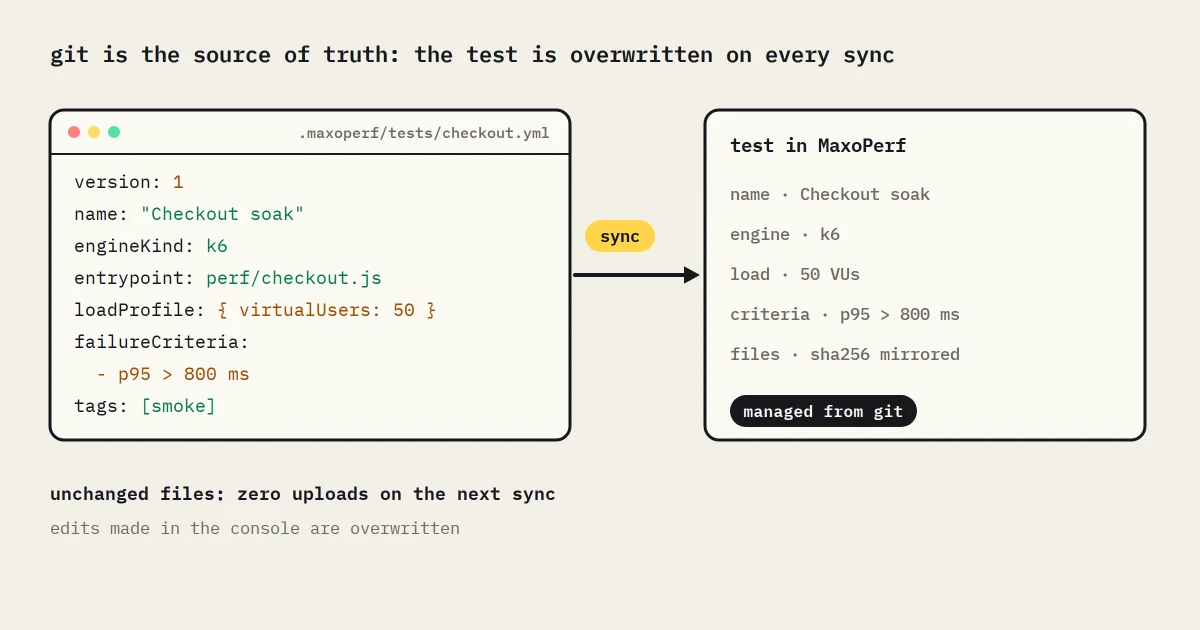
A load test is code. It has an entry script, a set of parameters, a pass/fail rule and a set of files it depends on. Yet in most organizations it is stored as a form: fields in a web console that one person filled in last spring. Nobody reviews a change to it, nobody can see what it looked like when a regression slipped in, and it cannot be recreated in a clean workspace without somebody’s memory.
Tests as code is the straightforward fix: the definition lives in the repository, next to the service it tests, and a tool applies it to the platform. This post describes how MaxoPerf does that, in enough detail that you can judge whether it suits your repository before you adopt it.
Why bother
There are four concrete payoffs, and none of them is about fashion.
- Review. A change to a threshold or a load profile arrives as a diff in a pull request. “Why did p95 become 1200?” has an author and a reviewer.
- History.
git logon the test file tells you when the load model changed. When a result moves, you can tell whether the code or the test moved. - Reproducibility. A fresh project, a second workspace or a disaster recovery environment gets the same tests by running a sync.
- Locality. The test sits beside the code it exercises, so the person changing the checkout handler sees the checkout test in the same change.
The cost is that the repository becomes the authority. That is a decision worth making deliberately, and the rest of this post describes what it means in practice.
The file
Put one YAML document per test in .maxoperf/tests/, with a .yml or .yaml extension. The filename is yours to choose; the identity of the test is the name inside.
version: 1name: "Checkout soak"engineKind: k6entrypoint: perf/checkout/script.jsassets: - perf/checkout/users.csvloadProfile: { virtualUsers: 50, agentCount: 1, rampUpSeconds: 30, durationSeconds: 300, maxVirtualUsersPerRunner: 50 }locationPlan: { rows: [{ kind: managed, cloudProvider: aws, region: us-east-1, runnerCount: 1, weight: 1 }] }failureCriteria: - { subject: "p95", condition: ">", threshold: 800, unit: "ms" }tags: ["nightly"]config: ["TARGET_URL"]secrets: ["CHECKOUT_API_TOKEN"]The fields, as the parser enforces them:
versionmust be1, andname,engineKind,entrypointandloadProfileare required.entrypointis a path relative to the repository root.assetslists further files the script needs, such as a CSV of users.- One of
locationPlanorprivateDatacenterIdis required, so every test says where it runs. The first points at managed regions, and the second points at your own private datacenter. failureCriteriais a list of mappings that each need asubject, acondition(one of>,<,>=,<=,=,==) and a numericthreshold. Defaults fill in the rest.projectIdis optional. The project comes from the--projectflag or the action’sproject-idinput first, then the file’sprojectId, then theMAXOPERF_PROJECT_IDenvironment variable. If none is set, that file reports an error.tags,configandsecretsare lists of strings. The last two bind workspace config values and workspace secrets to the test by key.type, if present, must besingle.
Any other top-level key is rejected with a message naming it, and no API call is made for that file. This is intentional. A format that quietly ignores a misspelled failureCriteria is a format that quietly runs without a gate.
What a sync does
maxoperf push (and the first half of maxoperf run, and the action with command: push) reconciles each file with the platform:
- Look up the test by exact
namein the project. Create it if it is missing, otherwise update it. - Replace its bindings with exactly the
configandsecretskeys you listed. If a key does not exist in the workspace, that file fails and the message names the key. - Mirror the files. Anything whose sha256 differs from the stored copy is uploaded, and files you no longer list are deleted. A file whose hash matches is not uploaded again.
- Write the full test configuration from the YAML, last, and record where it came from: repository, path and commit.
Two properties follow. A second sync of an unchanged repository uploads nothing and creates no new tests, so it is safe to run on every push. And the order matters: the configuration is written after the files because completing or deleting a file makes the platform re-validate the script and merge values it finds there. Writing the YAML last means the YAML wins.
If one file is broken, the others are still synced and the command exits with code 2. The server’s validation errors are shown verbatim for the file they belong to.
Git wins
The rule that surprises people is the one that makes the system coherent. After a sync, the test is exactly what the file says. If somebody changed the load profile in the console, the next sync puts it back. Bindings added through the console are dropped. Files not listed are deleted.
The console tells you this. A test managed from git shows a banner naming the repository, path and short commit, with the last sync time, and the reminder that edits made in the console are overwritten on the next sync. You can still run the test from the console, which is useful for a quick one-off, but treat the console as read-only for that test.
If you need a one-off variation, do not edit the test. Use a per-run override instead: --config KEY=VALUE on the CLI or config-overrides in the action. That changes values for that run only and leaves the test alone. Load testing preview deployments uses exactly this to point one test at many URLs.
Getting your existing tests into git
You do not have to write the YAML by hand. The “Run from CI” dialog on a test in the console has a test-file tab that exports the test as a version 1 YAML document plus its files, with suggested repository paths. Commit those, and the next sync recognizes the test by name and takes it over.
Not every test is exportable. A test must be a single upload-mode performance test; one with browser settings, a probe link or binding aliases cannot be expressed in the format. In that case the export refuses and lists each reason, rather than producing a file that would lose settings.
The pitfalls
Do not start runs of a test while a push of it is in flight. A sync replaces files and configuration; a run that begins in the middle can see half of it. The CLI runs tests one after another, which avoids this inside a single invocation.
Fan out after you push, not before. If you run a CI matrix, run push once in an earlier job and make the matrix depend on it (needs: push). Two matrix legs that sync a test for the first time at the same moment can both create it. The CLI cannot merge them afterwards, and a later sync refuses to continue while two tests share a name, naming both ids, so the problem is visible rather than silent. Remove the duplicate test, then sync again.
Keep names stable. The name is the key. Renaming a test in the file creates a new test and leaves the old one behind, with its history.
Keep secrets out of the file. The file lists the names of workspace secrets to bind. The values stay in MaxoPerf. Per-run override values are stored on the run and returned by the API, so do not pass credentials through them.
Review the script and the YAML together. The load numbers can come from either. When a pull request changes perf/checkout/script.js, the reviewer should also see the YAML next to it.
A workflow that uses all of this
name: perf-syncon: push: branches: [main] paths: [".maxoperf/**", "perf/**"]jobs: sync: runs-on: ubuntu-latest steps: - uses: actions/checkout@v4 - uses: MaxoPerf/github-action@v1 with: api-key: ${{ secrets.MAXOPERF_API_KEY }} account-id: ${{ vars.MAXOPERF_ACCOUNT_ID }} project-id: prj-0123456789 command: pushMerging to main publishes the tests. Pull request workflows then run them against the code under review, which is the subject of failing a pull request on p95. Keeping sync on main and runs on pull requests means a branch cannot rewrite the shared test just by being opened, though you should think about which behavior you want, because a pull request that runs command: run also syncs the files it contains.
Adopt it gradually
Start with the one test your team already runs most. Export it, commit it, run push from a workflow and confirm the banner appears. Move the next test when the first has survived a few weeks. The tests in git how-to has the same steps with screenshots, and the GitHub Actions guide covers the surrounding workflow.
When you are ready, export your first test from the console and commit it to .maxoperf/tests/.
Questions this article answers
Which settings can a test file describe?
Version 1 covers plain performance tests that upload a script, one test per file - engine, entrypoint, assets, load profile, location, failure criteria, tags and bindings for workspace config values and secrets. Browser tests and a few console-only settings are outside the format.
Can I still edit a git-managed test in the console?
You can, but the next sync overwrites the console edit with the file. Git wins, and the test shows a Managed from GitHub banner that says so.