Load Testing Preview Deployments, One Test for Every URL
Point the same load test at each pull request's preview URL with a per-run TARGET_URL override. Workflow, safeguards and what a preview can and cannot tell you.
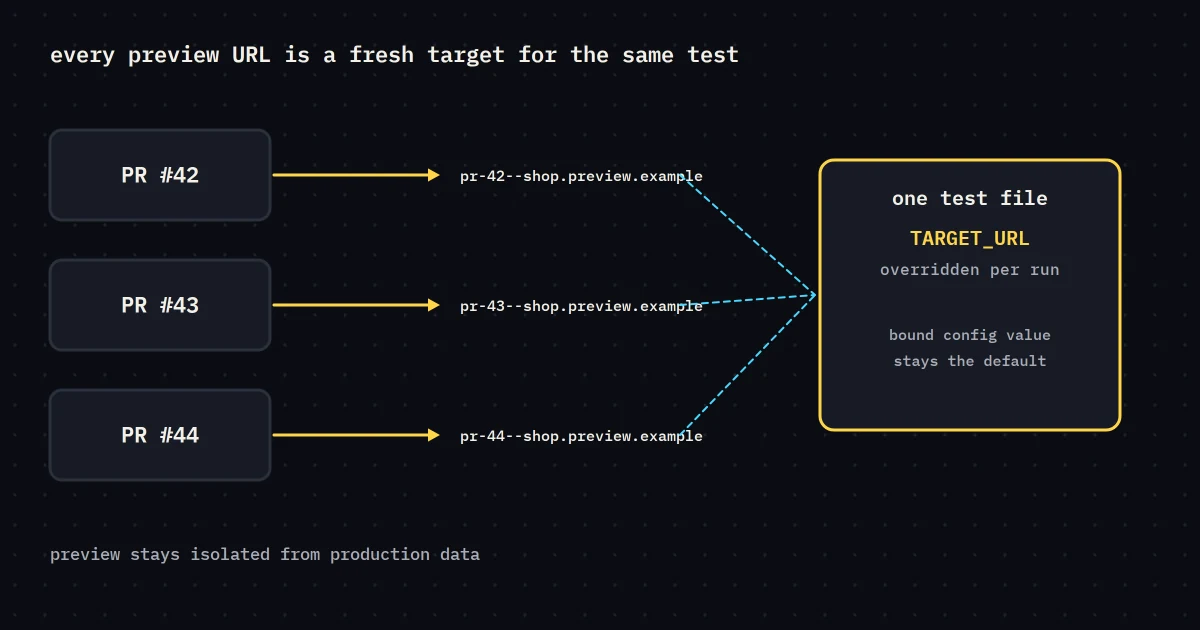
Preview deployments give every pull request its own running copy of the application. That is the ideal place for a performance check, because the thing being measured is exactly the change under review. The obstacle is mechanical: the URL is different every time, and it only exists after the platform has finished building it.
This post shows how to give one test a different target on each run, driven either by a GitHub deployment event or by a deploy hook, and how to keep the check honest about what a preview can tell you. It is written for generic hosts and Netlify. If you deploy on Vercel, which adds its own protection layers and CDN behavior that change what a load test measures, read load testing an app on Vercel without getting blocked and the Vercel how-to first; this post does not repeat that material.
One test, many URLs
The trick is that the target is a value, not a part of the test definition. A test reads its target from a configuration value, conventionally TARGET_URL. MaxoPerf lets a single run override that value, and the override applies to that run only: it is stored with the run, so a rerun of the same run reuses it, and it does not touch the stored test.
In a k6 script it looks like this:
import http from 'k6/http';import { check, sleep } from 'k6';
export default function () {  const res = http.get(`${__ENV.TARGET_URL}/api/products`);  check(res, { 'status is 200': (r) => r.status === 200 });  sleep(1);}
And the test file, committed as .maxoperf/tests/products-api.yml, does not mention any particular host:
version: 1name: "Products API preview check"engineKind: k6entrypoint: perf/products.jsloadProfile: { virtualUsers: 25, agentCount: 1, rampUpSeconds: 15, durationSeconds: 90, maxVirtualUsersPerRunner: 25 }locationPlan: { rows: [{ kind: managed, cloudProvider: aws, region: us-east-1, runnerCount: 1, weight: 1 }] }failureCriteria: - { subject: "p95", condition: ">", threshold: 800, unit: "ms" } - { subject: "error-rate", condition: ">", threshold: 1, unit: "%" }tags: ["preview"]If you want console runs to have a default target, create a workspace config value named TARGET_URL and list it under config: ["TARGET_URL"] in the file. The override then replaces the bound value for a CI run. A key that is not bound is simply added to the run’s environment under that name, so the binding is a convenience and not a requirement.
Path A: a GitHub deployment event
Many hosting platforms report a finished preview back to GitHub as a deployment status. When that happens a workflow can listen for it and read the preview address from the event:
name: perf-previewon: deployment_statuspermissions: contents: readjobs: load-test: if: github.event.deployment_status.state == 'success' runs-on: ubuntu-latest steps: - uses: actions/checkout@v4 - uses: MaxoPerf/github-action@v1 with: api-key: ${{ secrets.MAXOPERF_API_KEY }} account-id: ${{ vars.MAXOPERF_ACCOUNT_ID }} project-id: prj-0123456789 tests: .maxoperf/tests/products-api.yml config-overrides: | TARGET_URL=${{ github.event.deployment_status.environment_url }}The if line matters: a deployment goes through pending and in_progress before success, and you only want the last one. Platforms that send a repository_dispatch with the URL in the payload use ${{ github.event.client_payload.url }} instead. Which of the two your platform emits is in its documentation, so check before assuming.
A caveat on checkout: for deployment_status events GitHub runs the workflow from the default branch, so actions/checkout fetches the default branch unless you check out the deployment’s sha explicitly. That is fine if your test files are stable, and it is a surprise if you expect to test a changed .maxoperf file from the pull request. If the pull request changes the test, add ref: ${{ github.event.deployment.sha }} to the checkout step.
Path B: a deploy hook
If the platform does not report to GitHub, or you would rather not run a workflow at all, create a deploy hook. In the workspace, create a hook with a name, the tag preview and the default URL key TARGET_URL. MaxoPerf shows the hook URL once; store it in the platform’s environment as a secret.
Netlify can send a webhook on a successful deploy. MaxoPerf has a Netlify adapter that recognizes the delivery (a signed JWS header, or a body with deploy_ssl_url and site_id), acts only when the deploy state is ready, and takes the address from deploy_ssl_url, falling back to ssl_url, deploy_url and url. It places that address in TARGET_URL for every test carrying the tag. Create the notification in Netlify’s deploy-notification settings with the hook URL as the target, using JSON as the payload.
For a platform without a ready-made adapter, call the hook yourself from a final step, with a generic body:
curl -sS -X POST "$MAXOPERF_DEPLOY_HOOK_URL" \ -H 'content-type: application/json' \ -d "{\"configOverrides\":{\"TARGET_URL\":\"$PREVIEW_URL\"},\"ciContext\":{\"provider\":\"other\",\"source\":\"hook\"}}"The hook answers 202 with the run ids it started, or a list of tests it could not start with a reason. Notably, it does not wait for results and does not gate your deploy. If you need the verdict to block a merge, use the action or the CLI. Post-deploy smoke load from any CD explains hooks in depth, including signing.
Make a preview result mean something
A preview is not production. Treat the numbers accordingly.
- Compare like with like. Keep a baseline run on the same kind of preview, from the default branch, and judge a pull request against that, not against an absolute figure. A preview that runs on a single small instance will always look worse than production, and that is fine as long as it is consistently so.
- Warm it up. A freshly built preview is cold: caches empty, connections unestablished, sometimes functions not yet started. If your first requests are slow because of that, your p95 reflects the cold start. Either send a few requests before the load begins, or accept that the check measures cold behavior and say so. Avoiding flaky performance gates covers this.
- Mind the data. A preview usually has little data. A query that is fast on a hundred rows may be slow on a million, so a green preview check does not prove a query scales.
- Mind the dependencies. If the preview calls a shared staging database or a third-party sandbox, a load test hits those too. Point previews at disposable or isolated backends where you can, and never load test a third party’s service you do not own.
- Mind protection. Previews are often behind authentication, bot protection or rate limits. A load generator is exactly the kind of traffic those features block. Allow the traffic deliberately, for example with a bypass header kept in a workspace secret, rather than turning protections off for everyone.
Keep it small
Preview checks run once per pull request update, so they multiply. Keep each one short and light. A test with 25 virtual users for ninety seconds is plenty to catch a large regression, and it keeps the cost of a busy repository predictable. Combine it with the concurrency setting in the workflow so a newer commit cancels an older run.
If the preview environment itself is a shared resource, remember that a hook can start up to 20 tests per trigger. Tag only the tests you want on every preview.
Where to go next
Read the run after a deploy how-to for screenshots of both paths, and the deploy hooks reference for the Netlify and generic setups. A working workflow for this is also in the public examples folder.
Start with one preview check on your busiest repository and let it run advisory (fail-on: never) for a week before you make it required.
Questions this article answers
Does a preview deployment predict production performance?
Not in absolute terms. Previews often run smaller, share infrastructure and use a different data set. Use them to compare a change against a baseline taken in the same kind of environment, not to forecast production capacity.
Does the test file change for each preview?
No. The stored test keeps its default target and each run overrides TARGET_URL for that run only, so the same file serves every preview URL.