Post-Deploy Smoke Load Tests from Any CD with Deploy Hooks
Trigger tagged load tests from Argo CD, Jenkins, Netlify or a plain curl after a deploy. How MaxoPerf deploy hooks work: tags, URL override, signing, limits.
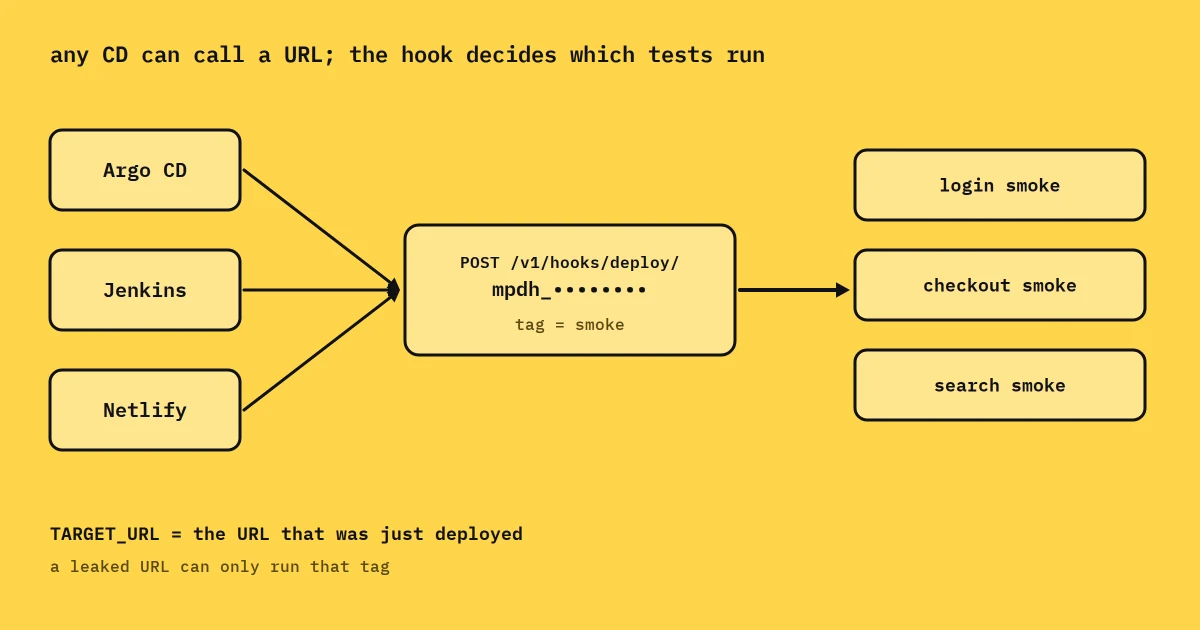
Not every delivery pipeline can run an arbitrary step after a deploy. Some deploys are done by a platform on your behalf. Some are done by a GitOps controller that only reconciles manifests. Others belong to a different team, whose pipeline you can add a webhook to but not a build step. What almost all of them can do is call a URL.
A deploy hook turns that into a post-deploy smoke load test. This post explains how it works, how to set one up for a generic pipeline, Netlify and GitHub, and the safety properties you should know before putting its URL anywhere.
What a deploy hook is
A deploy hook is a named URL bound to a tag. Calling it starts one run for every non-deleted test in the workspace that carries that tag, and passes the freshly deployed address into each run as a configuration override. It lives in a workspace, you create it in the console, and the full URL is shown once, at creation or rotation.
POST https://app.maxoperf.com/v1/hooks/deploy/mpdh_...The pieces:
- Name, unique in the workspace. A good name says where it is wired, such as “Prod smoke after Argo sync”.
- Tag, the set of tests that run. Choose a tag like
smokeand put it on a handful of short tests. - URL key, the config value that receives the deployed URL,
TARGET_URLby default. - Allowed override keys, an optional list of extra keys a generic caller may set, up to 20.
- Signing secret, an optional workspace secret. When set, an unsigned or badly signed call is rejected.
The token is stored only as a hash plus its last four characters for display. A soft-deleted hook stops working immediately, and rotation gives you a new URL while invalidating the old one.
Write the tests the hook will run
Hook tests are ordinary tests from .maxoperf/tests/, selected by tag. A smoke test should be quick and cheap, because it runs after every deploy:
version: 1name: "Checkout smoke"engineKind: k6entrypoint: perf/smoke-checkout.jsloadProfile: { virtualUsers: 25, agentCount: 1, rampUpSeconds: 10, durationSeconds: 60, maxVirtualUsersPerRunner: 25 }locationPlan: { rows: [{ kind: managed, cloudProvider: aws, region: us-east-1, runnerCount: 1, weight: 1 }] }failureCriteria: - { subject: "p95", condition: ">", threshold: 1000, unit: "ms" } - { subject: "error-rate", condition: ">", threshold: 1, unit: "%" }tags: ["smoke"]The script reads __ENV.TARGET_URL. Sync the file from CI (maxoperf push, or the action with command: push) so the test exists before the first deploy fires the hook. If the hook finds no test with its tag, there is nothing to run, and the response carries ignored: "no_tests_with_tag".
Call it from a generic pipeline
For any system that can run a shell command, curl is enough:
curl -sS -X POST "$MAXOPERF_DEPLOY_HOOK_URL" \ -H 'content-type: application/json' \ -d "{\"configOverrides\":{\"TARGET_URL\":\"https://staging.example.com\"},\"ciContext\":{\"provider\":\"other\",\"source\":\"hook\",\"sha\":\"$GIT_COMMIT\"}}"The body is optional JSON with two optional fields. configOverrides is a map of key to value. The deploy URL key and the keys on the hook’s allowlist are accepted; any other key gets 400 HOOK_OVERRIDE_NOT_ALLOWED and no runs start. ciContext records where the run came from: provider and source are required, and you may add repository, sha, branch, prNumber, environment and an https runUrl. A malformed value gets 400 HOOK_PAYLOAD_INVALID.
Note the content type. A body that is not JSON, which includes GitHub’s default application/x-www-form-urlencoded, is rejected with a message telling you to send the webhook as application/json.
In Jenkins, the same command in a post-deploy stage, with the URL held as a secret text credential:
stage('Smoke load') { steps { withCredentials([string(credentialsId: 'maxoperf-deploy-hook', variable: 'MAXOPERF_DEPLOY_HOOK_URL')]) { sh '''curl -sS -X POST "$MAXOPERF_DEPLOY_HOOK_URL" -H 'content-type: application/json' -d '{"configOverrides":{"TARGET_URL":"https://staging.example.com"},"ciContext":{"provider":"jenkins","source":"hook"}}' ''' } }}In Argo CD, a PostSync hook Job that runs the same curl does the job. Because the deploy hook answers quickly, it will not hold up your sync.
Let the platform send the payload
For three common sources you do not write the body at all. MaxoPerf detects the sender and extracts the deployed URL itself:
- GitHub. A repository webhook for deployment status events. It acts on
deployment_statuswithstateequal tosuccess, and usesenvironment_url, falling back totarget_url. Other events, includingping, are acknowledged and ignored. Set the webhook’s content type to JSON. - Vercel. Recognized by the
x-vercel-signatureheader or an event type starting withdeployment.. It acts only ondeployment.succeededand uses the deployment URL, addinghttps://when the scheme is missing. Vercel specifics, protection layers and cache behavior belong in the Vercel how-to. - Netlify. Recognized by its signed header or a body with
deploy_ssl_urlandsite_id. It acts only whenstateisready.
When an event does not qualify, the hook answers 202 with an ignored reason such as event_not_success and starts nothing. That is the expected behavior for in-progress deploys, not an error.
What the response tells you
A successful trigger answers 202:
{ "hookId": "...", "source": "generic", "triggered": [{ "testId": "tst-...", "runId": "run-...", "replayed": false }], "blocked": []}blocked lists tests that could not start, each with a code and a reason. That covers plan limits, a failed validation and a test cap: at most 20 tests start per trigger, and extras are listed as blocked with HOOK_TEST_LIMIT. The console shows the last trigger result on the hook so you can see what happened without reading logs.
Runs start under the identity of whoever created the hook, with the same permissions, plan limits and billing as any other run. If that person leaves the account, triggers fail with 403 HOOK_OWNER_UNAUTHORIZED until an admin rotates the hook, which reassigns it to the rotating admin.
Retries and duplicates
Webhook senders retry. MaxoPerf deduplicates per test using a key built from the hook and the delivery id: the GitHub delivery header, the Vercel or Netlify event id, or an Idempotency-Key header you send on a generic call. A redelivered webhook returns the same run ids with replayed: true and starts nothing new. If you call the hook yourself, send a stable Idempotency-Key, such as the pipeline run id, so a retry of your own step cannot start a second billed run.
Lock it down
A hook URL is a credential. The following keeps the blast radius small.
- Store it as a secret in the system that calls it, never in a repository.
- Add a signing secret. With a secret set, the sender’s signature is required: GitHub’s
X-Hub-Signature-256, Vercel’sx-vercel-signature, a Netlify JWS, or for generic callsX-Maxoperf-Signature: sha256=<hex>. The hex value is an HMAC-SHA256 of the raw request body with the secret as the key:
body='{"configOverrides":{"TARGET_URL":"https://staging.example.com"},"ciContext":{"provider":"other","source":"hook"}}'sig=$(printf '%s' "$body" | openssl dgst -sha256 -hmac "$HOOK_SIGNING_SECRET" | sed 's/^.* //')curl -sS -X POST "$MAXOPERF_DEPLOY_HOOK_URL" -H 'content-type: application/json' -H "X-Maxoperf-Signature: sha256=$sig" -d "$body"- Allow few override keys. Without an allowlist a generic caller can only set the URL key.
- Tag narrowly. The tag defines everything a leaked URL can run.
- Rotate on suspicion. Rotation invalidates the old URL at once.
An unknown, rotated or deleted token gets a generic 404, so the endpoint does not confirm which tokens ever existed, and the trigger is throttled per client IP.
When not to use a hook
Use the GitHub Action or the CLI when you want the pipeline to wait and fail on the verdict. A hook is fire-and-forget by design. It fits when the deploy system cannot run a step, and when a failed smoke should alert people rather than roll back. Read results in the console, and consider notifications for failures.
Try it
Create one hook, tag two short tests smoke and call the hook from your next deploy. The deploy hooks reference has the exact setup for each sender, and the run after a deploy how-to shows the GitHub variants.
Questions this article answers
Does a deploy hook wait for the test result?
No. It answers 202 as soon as the runs are started and lists the run ids. To block a pipeline on the verdict, run the GitHub Action or the CLI in the pipeline instead.
What can someone do with a leaked hook URL?
Run the tests that carry the hook's tag, with the deployed URL and any explicitly allowed override keys. Rotate the hook to invalidate the old URL immediately, and add a signing secret so unsigned calls are rejected.