Avoiding Flaky Performance Gates in CI
A performance gate that fails at random gets disabled. Stabilize it with idempotent triggers, a controlled target, warm-up, sensible criteria and an advisory phase.
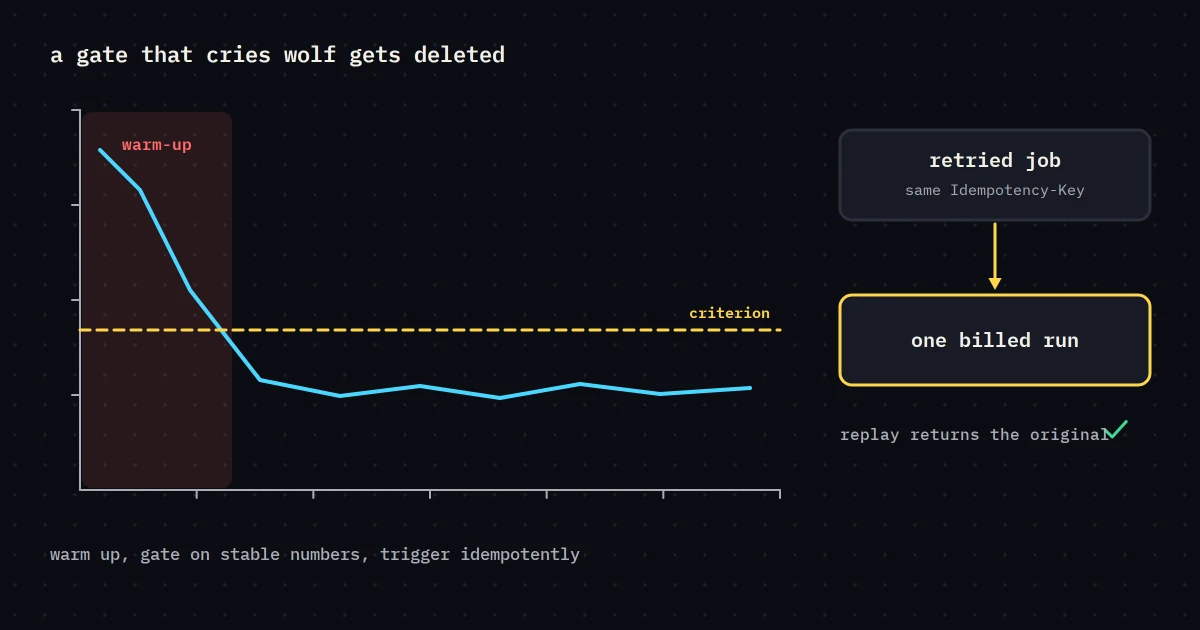
Every team that adds a performance gate goes through the same arc. The first weeks are exciting, because it catches a real regression. Then it fails on a Tuesday for no visible reason, somebody re-runs it and it passes, and by the end of the quarter the check is marked “allowed to fail”. A gate that people route around is worse than none, because it still costs time and now also teaches everyone to ignore red.
Flakiness in performance checks has causes you can name and mostly remove. This post lists them in the order that tends to pay off, with the parts that MaxoPerf handles for you called out so you do not rebuild them. It is the companion to deterministic performance tests in CI, which covers the statistics; this one covers the plumbing.
First, classify the failure
Before changing anything, decide which kind of failure you are looking at. Three are easy to confuse.
- The software got slower. A real finding. The same test, against the same kind of environment, fails repeatedly after one change.
- The environment was different. The target was cold, busy, mid-deploy or sharing resources with something else. The test is fine and the number is not comparable.
- The pipeline could not produce a verdict. The run did not start, hit a plan limit, or timed out. Nothing was measured.
The third is the one a gate must never report as the first. With the CLI, the exit code separates them: 1 means a run failed or was cancelled, while 2 and 3 mean a test-file problem or an API/network/limit/timeout problem. The action fails the job in each case, but its message and the job summary tell you which. Treat “no verdict” as an infrastructure alert, and keep the red gate for real findings.
Make triggers idempotent
Retries are the quiet source of duplicate load. A network blip while starting a run, a webhook delivered twice, a developer re-running a failed job: each can start a second test against your staging environment, and the two overlap, and each distorts the other’s numbers.
MaxoPerf enforces idempotency where it matters:
Idempotency-KeyonPOST /v1/runs. The same key from the same account within 24 hours returns the original run, with anIdempotent-Replayed: trueheader, and starts nothing. The same key with a different test is rejected with422 IDEMPOTENCY_KEY_REUSED. Concurrent identical requests produce exactly one run.- The CLI and the action use it for you. Each test’s start carries a key made from the pipeline run, attempt, test and a random nonce. If a network error or server error interrupts the call, the same key is retried up to three times, so you cannot double-start a billed run by accident.
- A CI re-run is a new run on purpose. Each invocation, and each matrix leg, generates a new nonce. That is right: a developer who re-runs a job wants a fresh measurement.
- Deploy hooks de-duplicate per delivery. A redelivered webhook returns the same run ids with
replayed: true.
If you call the API yourself, do the same. Send a stable Idempotency-Key, for example the pipeline id plus the test name, on every start request, and a retry of your step becomes harmless. Only the test id is compared on replay, so do not rely on changing overrides to get a different run under the same key.
Control the target
Most flaky gates are flaky because the thing being measured moves.
- Dedicated environment for the gate, or at least a quiet one. A shared staging environment that someone else is load testing, deploying to or migrating will produce noise. Where you cannot isolate it, schedule around it, and cancel superseded runs with the workflow’s
concurrencysetting so two commits do not overlap. - Fixed data. If the test reads from a database that other jobs mutate, response times follow the data. Use a stable seed, and make the script tolerate what it creates.
- Same shape every time. Keep the load profile, runner region and engine version stable. A change in any of them is a change in the experiment. Because the test is a file in git, such changes arrive as reviewed diffs, which is the point of tests as code.
- Do not test while deploying. In a post-deploy flow, wait for the deployment to be ready. The deployment events and hook adapters act only on a successful or ready state for this reason.
Warm up on purpose
A cold target makes the first seconds of every run slow: empty caches, new connections, lazily started processes. If your gate’s p95 includes that, it measures whatever happened to be cold today.
You have two honest choices. Either make the test warm the target before the measured load, or say plainly that the check measures cold behavior and choose thresholds to match. A simple approach in k6 is the setup() function, which runs once before the virtual users begin:
import http from 'k6/http';import { check, sleep } from 'k6';
export function setup() {  for (let i = 0; i < 20; i++) {    http.get(`${__ENV.TARGET_URL}/api/products`);  }}
export default function () {  const res = http.get(`${__ENV.TARGET_URL}/api/products`);  check(res, { 'status is 200': (r) => r.status === 200 });  sleep(1);}
Combine that with a gradual ramp in the test file so the load does not hit a cold system at full strength:
loadProfile: { virtualUsers: 25, agentCount: 1, rampUpSeconds: 30, durationSeconds: 120, maxVirtualUsersPerRunner: 25 }Warm-up does not remove the first-request cost that real users experience, so keep a separate, deliberate cold-start test if that matters to you. The point of a gate is comparability.
Choose criteria that mean something
A criterion is a claim you are willing to act on. A few rules keep them from crying wolf.
- Gate on p95, not the average. An average hides the tail that users feel, and a maximum is a single unlucky request. A high percentile over a few thousand samples is stable enough to gate.
- Pair latency with errors. A service returning fast failures passes a latency criterion. Add an error-rate ceiling, and assert on the response in the script.
- Set thresholds from measurement. Run the test several times on the base branch. Place the threshold above the observed spread and below the pain. If the spread itself is large, fix that before tuning.
- Keep the count small. Two or three criteria that always mean something beat ten that sometimes do.
- Check the sample size. A short run at low load yields few samples, and percentiles of few samples are noisy. The longer or busier the run, the steadier the figure. Do not make a short, tiny test a blocking gate.
failureCriteria: - { subject: "p95", condition: ">", threshold: 800, unit: "ms" } - { subject: "error-rate", condition: ">", threshold: 1, unit: "%" }Start advisory, then promote
Do not make a new gate blocking on day one. Run it without failing the build, watch it for a couple of weeks, and read every red result before deciding whether it was real.
- uses: MaxoPerf/github-action@v1 with: api-key: ${{ secrets.MAXOPERF_API_KEY }} account-id: ${{ vars.MAXOPERF_ACCOUNT_ID }} fail-on: neverWith fail-on: never the action still syncs, runs and writes the job summary, but the job stays green. In the CLI the equivalent is --fail-on never. When a fortnight of results has no false reds, delete that line, and the same check becomes blocking.
Make failures easy to triage
A flaky gate is often really a slow triage process. Reduce the time to an answer.
- Name tests for what they check, so the pull request comment is readable at a glance.
- Keep the link. The job summary and the PR comment link to the run report, which shows latency over time. A failure that started at second ninety, not second one, is a different story.
- Compare with a good run. Comparing load test runs shows how to line up the failing run against the last passing one.
- Know the commit. Each run records the repository, commit, branch and pipeline link, so “which change” is a lookup. See tracing a regression to a commit.
Handle the verdict you cannot get
Some failures are not the software’s fault, and the gate should say so. In a script that wraps the CLI, branch on the exit code:
npx @maxoperf/cli run; code=$?case "$code" in 0) echo "perf gate passed" ;; 1) echo "perf gate failed: a run did not meet its criteria"; exit 1 ;; *) echo "no verdict (exit $code): setup, limit, API or timeout"; exit "$code" ;;esacWhether a “no verdict” blocks the merge is a policy choice. Many teams let it warn and alert the owner of the pipeline, because blocking a merge on an outage in a third-party service teaches the same lesson as a flaky gate.
A short checklist
- Classify the failure: software, environment or no verdict.
- Send idempotency keys, or let the action and CLI do it.
- Control the target: quiet environment, fixed data, ready deploy.
- Warm up, and ramp gradually.
- Gate on p95 plus errors, with thresholds from measured variance.
- Run advisory first.
- Make triage quick: names, links, commit.
Apply the checklist to the check that annoys your team most, starting with fail-on: never if it is currently blocking. The gate pull requests how-to and the CLI reference have the options in full.
Questions this article answers
Does re-running a CI job start a second load test?
Yes, by design. A CI re-run is a new invocation with a new idempotency key. Within one invocation, retries after a network or server error reuse the key, so a transport retry cannot start a second billed run.
Should a flaky performance gate just get a higher threshold?
Only after you have checked what varies. Raising a threshold to silence noise hides real regressions. First control the target, the load and the warm-up, then set the threshold from measured variance.