Load Testing an App on Vercel Without Getting Blocked
Why Vercel blocks load tests, what each bypass covers, how to ramp, and how MaxoPerf's blocked-traffic notice tells you the target pushed back.
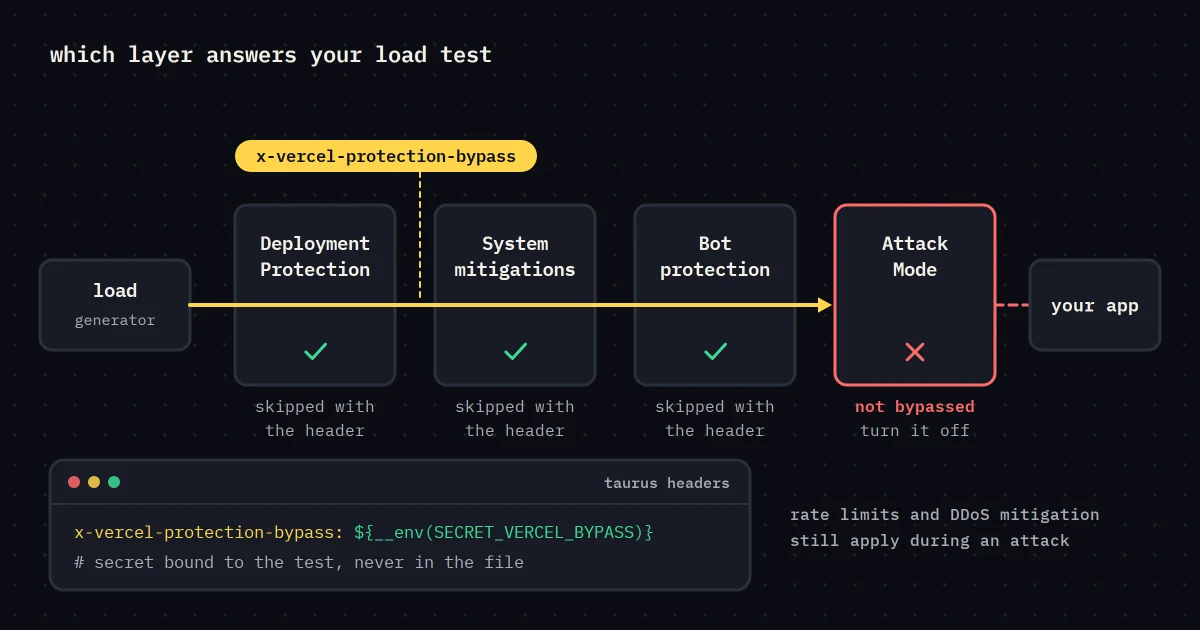
The first load test most teams run against a Vercel deployment ends early. Latency looks excellent, throughput is flat, and the error rate is either zero or close to 100 percent. All three outcomes have the same cause: the requests never reached the application. Something in front of it answered instead.
This article lists the layers that can answer for your app, what Vercel documents about getting past each one, and how to tell from a MaxoPerf run which layer you hit. The step-by-step setup lives in the how-to Load test an app on Vercel. Everything attributed to Vercel here comes from Vercel’s own documentation, linked inline and read on 2026-11-21. Vercel changes limits and behaviour over time, so check the linked pages before a large run.
Four things that answer instead of your app
A load generator sends many similar requests from a small set of addresses at a steady or rising rate. A Vercel deployment can answer such traffic from four places before your code runs.
Deployment Protection. Preview deployments and any project with Vercel Authentication, Password Protection or Trusted IPs turned on answer an unauthenticated request with a challenge. The challenge is fast and identical for every request. A test that checks only the status code can report a fast, stable run against a login wall.
Firewall system mitigations. Vercel’s Firewall applies system mitigations that can block requests. Vercel’s load-testing guide warns against instant jumps to very high rates, because they look nothing like production traffic.
Bot protection. Vercel’s Bot protection can issue challenges to automated traffic. The bypass page lists those challenges among the checks a valid secret skips.
Attack Mode. Vercel’s load-testing guide is explicit that System Bypass rules do not bypass Attack Mode and that you should disable it before a test.
Each layer has a different fix, and mixing them up wastes a test window. The table below maps what you see to where to look.
| What the run shows | Likely layer | Where to look |
|---|---|---|
| Fast responses, very low latency, assertion on body content fails | Deployment Protection | Send the bypass header |
403 or 429 on most requests, starting early in the ramp | Firewall mitigations or Bot protection | Header bypass, slower ramp |
403 or 429 persists after the header and IP rules are set | Attack Mode | Turn it off |
| Errors only above a certain rate | Rate limit or DDoS mitigation | Lower the rate, coordinate with Vercel |
The bypass header
Vercel’s Protection Bypass for Automation is available on all plans. You create a secret in the project settings, and requests that carry it in an HTTP header named x-vercel-protection-bypass skip several checks. Vercel’s documentation lists what the secret skips:
- Password Protection, Vercel Authentication and Trusted IPs checks
- System mitigations, meaning requests that the Vercel Firewall normally blocks
- Bot protection challenges
The same page lists what it does not override: active DDoS mitigations, rate limits that apply during a detected attack, and challenges triggered by attack patterns. Vercel describes this as intentional, so that you can test a protected deployment reliably while critical protections stay on during a real attack.
Two practical details from that page matter for load tests. First, the header is the recommended form. A query parameter with the same name also works, but URLs end up in logs, and a load test writes millions of them. Second, Vercel sets one of your secrets as the VERCEL_AUTOMATION_BYPASS_SECRET system environment variable at build time. If you regenerate or delete a secret, you must redeploy before the new value applies to a deployment.
In MaxoPerf, you store the secret once as a workspace secret and bind it to the test. The bound variable name must start with SECRET_, so a binding named VERCEL_BYPASS reaches the runner as SECRET_VERCEL_BYPASS. A Taurus scenario then sends it like this:
headers: x-vercel-protection-bypass: ${__env(SECRET_VERCEL_BYPASS)}The how-to has the same header for k6 and JMeter. MaxoPerf stores the value encrypted, keeps it out of run output, and the runner replaces it with [REDACTED] if a script prints it into an error message, so the secret does not end up in a results page.
When the header is not enough
The header covers deployment protection and most system mitigations. It leaves two gaps that need a different fix.
Attack Mode. Turn it off for the test. Nothing you send in a header changes that behaviour.
Source-IP rules. Vercel’s Firewall also supports System Bypass rules that match on the address a request comes from. Vercel’s load-testing guide says to set the source IP or range where possible, and limits the number of rules to 10 per project on Pro and 75 on Enterprise. A rule needs an address you know. MaxoPerf publishes no runner IP list for managed locations, so on managed runners the header is your route. If you need an IP rule, run the test from a private location: the agent runs inside your network, and the egress address belongs to you.
Vercel’s guide also tells you to prefer a bypass rule over Pause System Mitigations. Pausing removes system mitigations for the whole project for 24 hours, and you are responsible for the usage from all traffic in that window.
Ramp the load
The bypass removes the protection that rejects your test. It does not make a cold deployment ready for a vertical wall of traffic. Vercel’s guide warns against instant jumps to very high rates that you will not see in production, and recommends staged ramps that match expected traffic.
A ramp that survives contact with a protected platform has four properties:
- It starts low. Run the first stage at a rate you would not worry about, and keep the result as a baseline.
- It climbs in stages. Each step holds long enough to read latency and error rate, so a failure points to a rate.
- It stops on signs of blocking. A jump in
403or429responses is a reason to stop and read the notice, not to push harder. - It stays inside what Vercel agreed to. Vercel’s guide says to coordinate before significant or volumetric tests, and that a test needing 50k or more requests per second needs a ticket with Vercel’s engineering team.
Aim at a Staging or dedicated Preview deployment with production-like configuration and data. Testing production adds a risk you can avoid: if a mitigation does fire, real users share the deployment with it.
Cost is part of the test
Blocked requests are not free. Vercel’s guide states that you are responsible for any cost the test accrues. A run that is half challenge responses and half application responses still counts. Keep the first run short, and read the Vercel usage page before the second.
How MaxoPerf tells you the target pushed back
When a run finishes and the run had at least 100 samples and at least 30 percent of all samples were answered 403 or 429, or the target’s WAF identified itself in blocked responses, the run’s Overview shows a Blocked traffic notice. It states the blocked share and the response codes, then lists what to try: allowlist the runner IPs in your WAF or CDN, ask the WAF to bypass requests that carry a custom header you add to the test, or lower the rate and ramp up more slowly. The vendor signatures MaxoPerf recognises are Cloudflare, Akamai, Imperva, AWS WAF and Sucuri. Vercel is not among them, so on a Vercel target the 30 percent share is what triggers the notice.
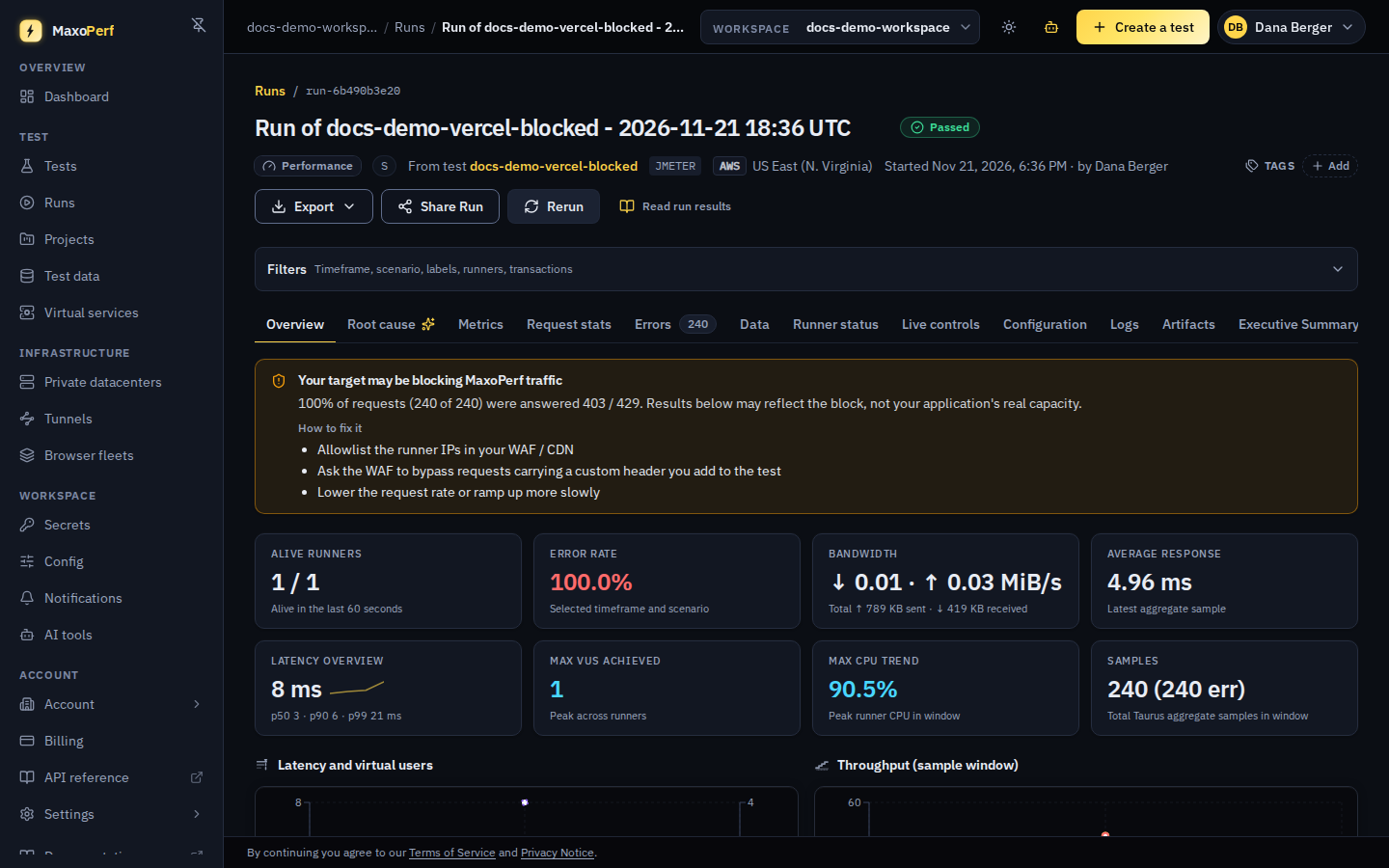
The Blocked traffic notice on a run Overview. The checklist is generic. On Vercel, the bypass header is the fix for managed runners, and the runner-IP allowlist applies to private locations. This is a seeded demo run against a demo shop, not a Vercel deployment, so read the layout and not the numbers.
The same verdict is available over the API as GET /v1/runs/{runId}/dashboard/blocked-traffic and in the blockedTraffic field of the run’s executive summary, which an automation can read without opening the console.
The notice appears only after a run ends, so it will not stop a test in progress. For a long test, watch the error rate on the run’s Overview during the first ramp stage and stop it yourself if errors climb early.
The notice judges response codes, so a protection that answered with a 200 would produce no notice. That is why a content assertion matters: add a check for a string that only your application renders, such as a field name from your API’s JSON. A run that fails that check on every request is a run that never reached your code, whatever its status codes say. What a Vercel load test actually measures covers the same trap from the cache side.
A pre-flight checklist
Run through this list before the first real stage:
- The target is a Staging or dedicated Preview deployment, and you have read Vercel’s load-testing guide.
- You have told Vercel about the test if it is significant or volumetric, and opened a ticket if it needs 50k or more requests per second.
- A bypass secret exists in the Vercel project, and you redeployed after creating or changing it.
- The secret is bound to the test as a
SECRET_variable, and the header name is spelled exactlyx-vercel-protection-bypass. - Attack Mode is off.
- Every request has an assertion on content that only your app produces.
- The ramp starts low, climbs in stages and has a stop condition.
- You know what the test will cost and where to read Vercel’s usage page.
If you work through the list and the run still reports blocking, send the blocked share and response codes from the notice to Vercel support. They can tell you which mitigation fired, which the response codes alone cannot.
MaxoPerf runs this kind of test from managed locations or from your own network. You can open the console and run the how-to against a Preview deployment.