Load Testing from GitLab CI and Jenkins with the MaxoPerf CLI
Run MaxoPerf load tests from GitLab CI, Jenkins, CircleCI or Bitbucket with npx @maxoperf/cli, gate on exit codes and attach CI context to every run.
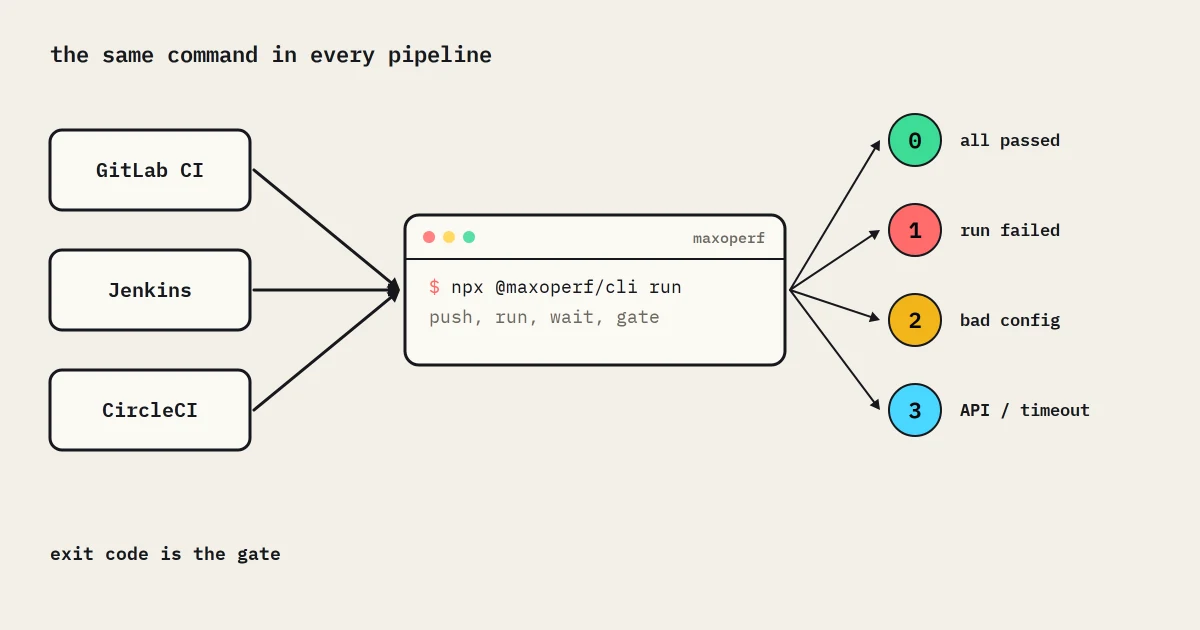
The GitHub Action is the shortest path if you live on GitHub. Plenty of teams do not. They run GitLab CI, Jenkins, CircleCI or Bitbucket Pipelines, and a performance gate should not depend on which vendor hosts the pipeline. For them there is @maxoperf/cli, an npm package whose command is maxoperf. The GitHub Action is a thin wrapper over the same sync-and-run engine, so everything in performance tests as code applies unchanged.
This post covers installation, the two commands, pipeline files for GitLab and Jenkins, and the details that matter in a real pipeline: exit codes, matrices, JSON output and secrets.
Install and configure
There is nothing to install if you use npx. The CLI needs Node 20 or newer; most CI images have it or can pull a node:22 image.
npx @maxoperf/cli pushnpx @maxoperf/cli run --config TARGET_URL=https://staging.example.comConfiguration comes from environment variables:
| Variable | Meaning |
|---|---|
MAXOPERF_API_KEY | Required. An API key. Keep it in the CI secret store. |
MAXOPERF_ACCOUNT_ID | Required. The account id. |
MAXOPERF_PROJECT_ID | Default project. The --project flag and a file’s projectId take precedence. |
MAXOPERF_API_BASE | Defaults to https://app.maxoperf.com. |
The key is never printed, not even in errors or in --json output, and neither are presigned upload URLs.
The two commands
maxoperf push [--tests <glob>]... [--project prj-...] [--root .] [--json] [--api-base URL]maxoperf run [push flags] [--config KEY=VALUE]... [--no-wait] [--fail-on criteria|never] [--timeout 60]push syncs your .maxoperf/tests/*.yml files to MaxoPerf and stops. run syncs and then starts each test, waits for it to finish and gates on the result. By default it looks for .maxoperf/tests/*.{yml,yaml}. Pass --tests to select a different glob or a single file, and repeat it for several. --config KEY=VALUE overrides a config value for this invocation only, which is how you hand the target URL to the test. --no-wait starts the runs and exits without a verdict, --fail-on never produces the verdict without failing the pipeline, and --timeout sets the maximum wait per run in minutes (default 60). Runs execute one after another.
GitLab CI
stages: [test, perf]
perf:  stage: perf  image: node:22  rules:    - if: $CI_PIPELINE_SOURCE == "merge_request_event"  script:    - npx @maxoperf/cli run --tests .maxoperf/tests/checkout-api.yml --config TARGET_URL=$REVIEW_APP_URL
Define MAXOPERF_API_KEY and MAXOPERF_ACCOUNT_ID in the project’s CI/CD variables, masked, and set MAXOPERF_PROJECT_ID there too or in the YAML. Protect the key variable if you only want it available on protected branches; a merge request from a fork will not receive it, so decide whether those pipelines should skip the job or run a lighter check. The job fails whenever the CLI exits non-zero, which is exactly what you want from a gate.
Jenkins
pipeline { agent { docker { image 'node:22' } } stages { stage('Perf gate') { steps { withCredentials([string(credentialsId: 'maxoperf-api-key', variable: 'MAXOPERF_API_KEY')]) { withEnv(['MAXOPERF_ACCOUNT_ID=acc-0123456789', 'MAXOPERF_PROJECT_ID=prj-0123456789']) { sh 'npx @maxoperf/cli run --config TARGET_URL=https://staging.example.com' } } } } }}withCredentials masks the key in the console log. If your agents do not have Node 20, use a container agent as above or install Node in the job. The same single npx line works in CircleCI (- run: npx @maxoperf/cli run) and in Bitbucket Pipelines (script: [npx @maxoperf/cli run]).
Exit codes are the contract
| Code | Meaning |
|---|---|
| 0 | Success; all runs passed. |
| 1 | A run failed or was cancelled (with --fail-on criteria). |
| 2 | Usage, test-file or validation error. |
| 3 | API or network error, a blocked start or a timeout. |
The split between 1 and the rest is useful. Code 1 means the system under test did not meet your criteria, which is a finding about the software. Codes 2 and 3 mean the pipeline could not produce a verdict, which is a finding about the setup: a typo in a test file, a plan limit, an outage, a timeout. In a pipeline you can treat them differently, for example by retrying on 3 and failing hard on 1:
npx @maxoperf/cli run; code=$?if [ "$code" -eq 3 ]; then echo "no verdict (API, limit or timeout)"; fiexit "$code"Machine-readable output
Add --json to print one JSON document on stdout, with progress on stderr, so a later step can read it:
npx @maxoperf/cli run --json > maxoperf-result.jsonPublish that file as a pipeline artifact. It gives reviewers the run ids and report links without opening the log.
What the CLI attaches to every run
It detects GitHub Actions, GitLab CI, Jenkins, CircleCI and Bitbucket Pipelines and sends the provider, repository, commit, branch, pull or merge request number where available, and a link to the pipeline run. In the console that shows up as a chip on the run and as a branch filter in the runs list. Detection reads each system’s standard environment variables, so no extra flags are required. Tracing a regression to a commit shows what that buys you.
Retries without double-billing
Each test’s run start carries an Idempotency-Key built from the pipeline run, the attempt, the test and a random nonce. If a network error or a server error interrupts the start, the CLI retries up to three times with the same key, so a transport retry cannot start a second billed run. When the API answers 429, the CLI waits for the Retry-After time, capped at 60 seconds, and retries up to five times. A pipeline retry is a new invocation and gets a new key, so a manual re-run really does start a new run. Avoiding flaky performance gates goes into why that distinction matters.
Matrices and parallelism
Runs inside one invocation are sequential. To run tests in parallel, split them across pipeline jobs, one test file per job with --tests. The rule that goes with it: run push once in an earlier stage and make the parallel jobs depend on it. Several jobs syncing a test for the first time at once can create duplicate tests, which later syncs then refuse to continue past.
sync:  stage: prepare  image: node:22  script: [npx @maxoperf/cli push]
perf:  stage: perf  image: node:22  parallel:    matrix:      - TEST: [checkout-api, search-api]  script:    - npx @maxoperf/cli run --tests .maxoperf/tests/$TEST.yml
Security notes
- Use a dedicated CI member for the API key and give it a short expiry, so a leaked key is limited in time.
- Override values passed with
--configare stored on the run and returned by the API. Do not pass tokens that way. Bind workspace secrets in the test file’ssecretslist instead. - Do not run the job for untrusted contributions that could change the test or the script. A test file runs code on a load generator against your target.
Choosing between the CLI, the action and a hook
The three entry points overlap, so it helps to say what each is for. Use the CLI when your pipeline is not on GitHub, or when you want the same command on a laptop and in CI, which makes a failing gate easy to reproduce locally. Use the GitHub Action on GitHub when you want the job summary and the sticky pull request comment without writing any glue. Use a deploy hook when the system that knows a deploy finished cannot run a step and can only call a URL. Many teams end up with two of them: the CLI or action for the pull request gate, and a hook for the post-deploy smoke, both running the same tagged files from the same repository.
Next step
Add the npx line to a non-blocking job, point it at a staging URL and read the output. When the numbers are stable, make the job required. The CLI reference lists every flag, and the GitHub Actions guide covers the GitHub side.
Questions this article answers
What does the CLI need to run?
Node 20 or newer, an API key in MAXOPERF_API_KEY, the account id in MAXOPERF_ACCOUNT_ID and, optionally, a default project in MAXOPERF_PROJECT_ID. Keep the key in your CI secret store.
How does the pipeline know a run failed?
Through the exit code. 0 means all runs passed, 1 means a run failed or was cancelled, 2 a usage or test-file error and 3 an API or network error, a blocked start or a timeout.