Warm-Up Periods: What to Exclude From Load-Test Results and Why
Excluding warm-up decides which question a run answers. Write the exclusion rule before the run so it cannot be tuned to flatter the result afterwards.
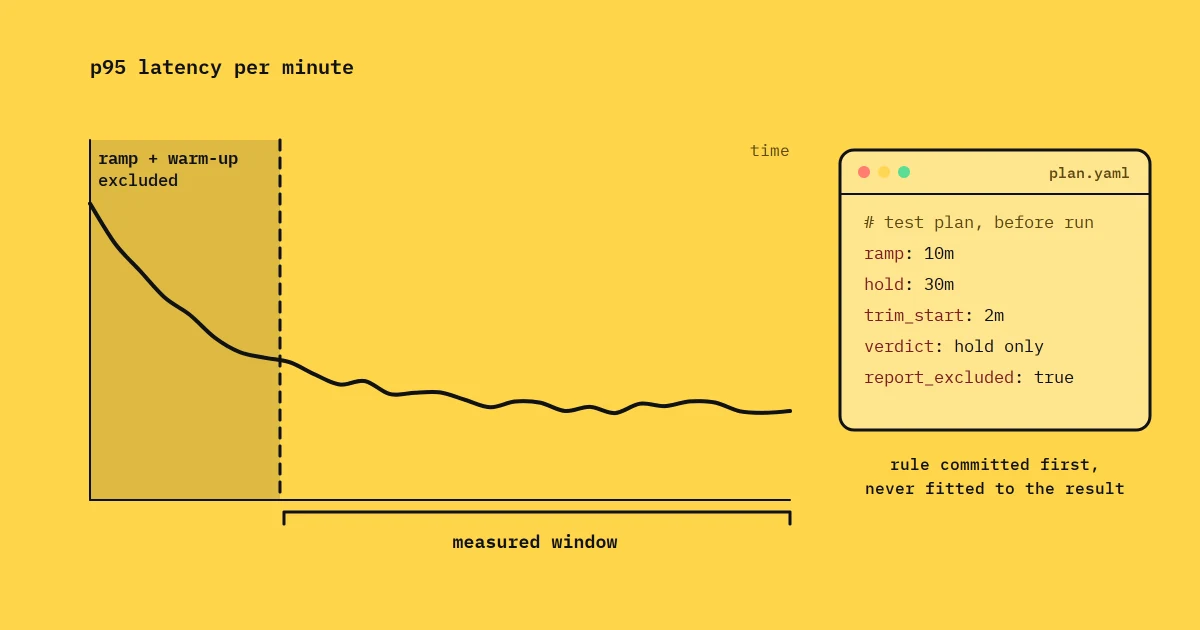
Every load test has a beginning during which the system looks different from how it looks later. Caches are empty, connection pools are filling, a runtime is compiling hot code paths, autoscaling has not yet reacted, and the generator itself is ramping. The first minutes usually show higher latency than the rest. People respond by trimming them off before computing percentiles, and that trimming is where results get quietly bent.
The trim is legitimate when it is a decision about which question the run answers. It becomes a problem when it is chosen after the numbers are known. This article shows how to make the decision first, write it down, and keep the cold behavior available instead of deleting it.
Warm-up is a question, not a setting
Two different questions share one chart.
The first is steady-state capacity: given a warmed system under constant load, what latency and error rate do we see? Warm-up samples are noise for that question, because they measure a transition the steady state does not contain.
The second is arrival behavior: what does the first user after a deploy, a restart or a scale-out see? Here the warm-up samples are the answer. A service that takes four minutes to reach normal latency after a new instance joins has a four-minute problem, and deleting those minutes from the report deletes the finding.
Most test plans need both, run as separate scenarios with separate reports. A steady-state run that excludes warm-up and a cold-start run that is analyzed only for the transition. Trouble starts when one run is asked to answer both and the author picks whichever reading looks better.
What warms up
Name the specific mechanisms in your system. It helps you decide how long the transition lasts and whether a timer or a signal should end it.
- Application caches and database buffer pools fill as keys are requested. Duration depends on the key distribution and the working set size.
- Connection pools open connections lazily. The first requests pay for TCP and TLS setup, and the pool grows toward its maximum under load.
- Managed runtimes such as the JVM compile frequently executed code progressively, so the first thousands of calls run slower. This is a property of the system under test, and it also applies to the load generator if the generator runs on such a runtime.
- Autoscalers and schedulers add capacity after a detection delay plus a provisioning delay.
- DNS and load balancer state settle. Early requests may concentrate on a subset of backends.
- The ramp itself. A load profile that climbs from zero to target over ten minutes has no steady state until it stops climbing.
Notice that the last item is the one most tests forget. If the ramp takes ten minutes and the run lasts twenty, half the run is a ramp, and “exclude warm-up” must mean “exclude the ramp” at the least.
Write the rule before the run
The exclusion rule belongs in the test plan, next to the thresholds, before anyone has seen a result. It has four parts:
- The phases of the run, by name and duration: ramp, hold, ramp down.
- Which phase is measured for the pass or fail verdict. Usually the hold.
- Any additional trim inside the hold, with its reason. For example “first 120 seconds of hold excluded because the application cache fill takes about that long in staging”.
- What gets reported about the excluded period, even if it does not count toward the verdict.
A short block in the test notes is enough:
phases: ramp: { duration: 10m, measured: false } hold: { duration: 30m, measured: true, trim_start: 2m } ramp_down: { duration: 2m, measured: false }verdict_window: hold after trim_startexcluded_reporting: publish p95 and error rate for ramp and first 2m of holdThe format does not matter. What matters is that the file is committed before the run, so a reviewer can see that the window was not adjusted to fit the result.
Pick the length from evidence, not from the answer
If you do not know how long warm-up lasts, find out in a separate exploratory run and record how you decided. Start a run at the target load and plot latency, error rate and the relevant internal signals (cache hit rate, pool size, CPU) over time. The point at which they stop trending is the end of warm-up. Set the trim to that point plus a margin, and keep it for the real runs.
A stability criterion is better than a fixed timer when the system varies. For example: warm-up ends when the rolling five-minute p95 changes by less than 5 percent for three consecutive windows. This is an illustration, and the thresholds should come from your own variance. The advantage is that a slower-than-usual warm-up extends itself instead of leaking into the measurement window. The disadvantage is that you need to compute it consistently, ideally in the pipeline, so two people do not apply it differently by eye.
Do not choose the trim by trying several values and keeping the one with the best p95. That is tuning the result. If you suspect the trim matters, publish the verdict for two or three trim values and show how much it moves. A verdict that flips between 90 seconds and 180 seconds is fragile, and that fragility is itself information.
Warm-up and comparisons
Run comparison depends on consistent windows. If the baseline run excluded two minutes and the candidate excluded five, the comparison measures the choice of window. Use the same rule for both runs and encode it in the pipeline. The run comparison guide lists the other conditions that need to match: data, environment, load shape and generator class.
A candidate that makes warm-up longer can hide behind a trim. Suppose a new build caches more aggressively, raising steady-state hit rate but lengthening the fill time from two to six minutes. A fixed two-minute trim would include four minutes of slow samples in the candidate’s window and make it look worse, and a trim chosen after the fact could make it look better. Reporting the transition separately is what makes the trade visible.
Do not trim the failures that matter
Some early problems are not warm-up. A burst of errors in the first minute can be a connection limit, a rate limiter tripping, a missing authentication token, or a misconfigured target. Excluding them as warm-up removes evidence of a defect. Apply the rule to latency percentiles with care, and apply a stricter rule to errors: examine each early error class and name its cause before excluding it. Warm-up can explain slow responses. It rarely explains 500 responses.
The ramp deserves attention for the same reason. The throughput knee often shows up during a ramp, as the point at which latency leaves its flat region. If you only report the hold, you may miss the load level at which the system started to bend.
Report the whole run, label the verdict
A report that shows only the measurement window invites the suspicion that the rest was hidden. Show the full latency and error timeline with the measurement window shaded, state the rule in one sentence, and give the verdict for the measurement window. Add the excluded period’s numbers in a short table. A reader who disagrees with the rule can then recompute with their own window, and a reader who agrees can move on.
Include the generator in the checklist. If your load generator needs its own warm-up, for example a runtime that compiles scripts as they run, include its transition in the excluded period and confirm from generator metrics that CPU was steady in the window you measure.
A short checklist
- Decide whether the run answers a steady-state question, a transition question, or both, and split the runs if both.
- List the warm-up mechanisms in your system and which signal shows each one finishing.
- Write phases, the verdict window and the trim in the test plan before the first run.
- Derive the trim from an exploratory run or a stability criterion, never from the result being judged.
- Apply the same rule to every run you compare.
- Analyze early errors by cause. Do not trim them away with the latency.
- Publish the full timeline with the window marked, and the excluded period’s numbers.
Making it routine on MaxoPerf
If you run tests on MaxoPerf, a ramp phase and a hold phase are part of the test definition, and results carry their timeline, so the full run stays on record while you analyze the window you declared. Putting the phase durations in the committed test file and the verdict window in your pipeline script keeps the rule versioned beside the test itself.