Latency Budget: How to Set One and Test It Under Load
A latency budget splits an end-to-end time target into allowances per hop. Learn serial vs parallel math, deadlines, retries and how to test a budget under load.
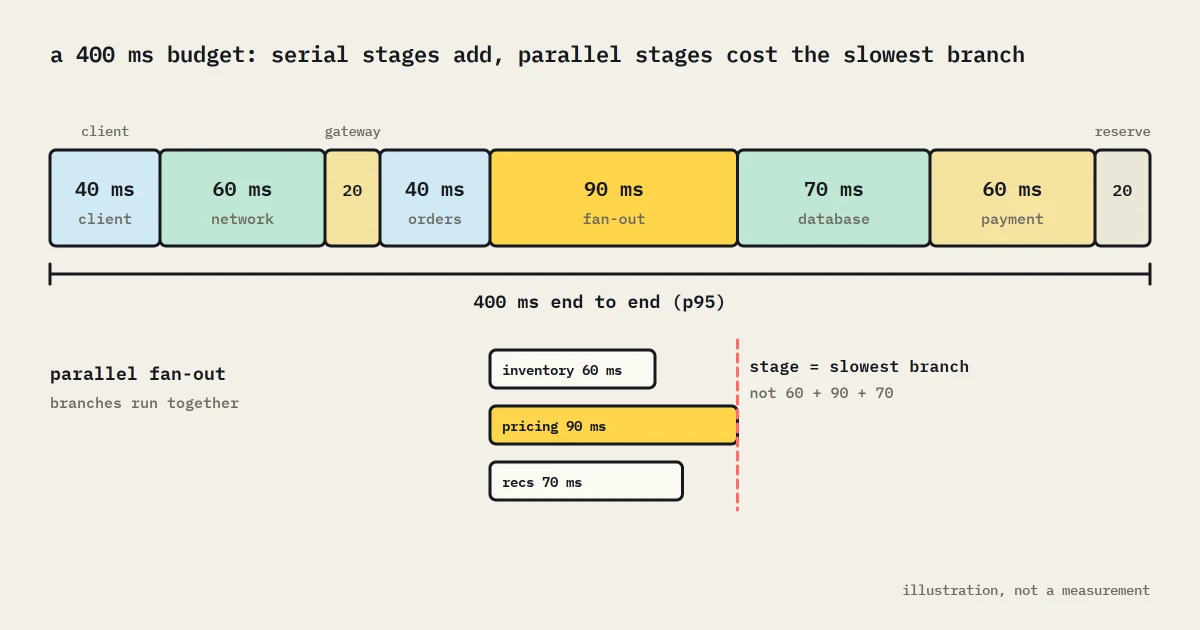
A latency budget is an end-to-end response-time target divided into allowances for each hop a request crosses. The allowances, plus a reserve, must add up to no more than the target. You set it once from what users or an SLO tolerate, then test that every hop stays inside its share under load.
Prerequisites
- An operation to budget, such as checkout submit, with a known traffic level.
- A baseline run with per-hop timing, from tracing or from per-request labels.
- Names for the teams or services that own each hop.
Start from the end-to-end number
The budget begins at the top. Pick the operation, a percentile and a limit, for example: “checkout submit finishes in 400 ms at p95.” Take the limit from one of two places.
- User tolerance: the delay users accept for that action before they give up. The latency tolerance guide covers the commonly cited limits of 0.1 s, 1 s and 10 s and how Apdex zones relate to them.
- An SLO: an agreed objective such as
p95 < 400 ms over 30 days, possibly with an error budget.
Write the percentile into the budget. A budget without one is ambiguous, because a hop meets its average allowance while its tail blows the total. Then subtract a reserve for variance you did not model. 5 to 10% of the total is a common starting point. A 400 ms target with a 20 ms reserve leaves 380 ms to allocate.
Split the budget across hops
List every stage between the user’s action and the final response, and give each an allowance based on measurement, not on equal shares:
- Client: rendering, serialization, request construction.
- Network: the round trip between the client and your edge, which you rarely control.
- Gateway or load balancer: TLS, routing, authentication.
- Services: the business logic of each service in the path.
- Database and caches: queries, connection waits.
- Third parties: payment, identity, search or other external APIs.
Use a measured p95 or p99 per hop from a baseline run as the starting point. If a hop’s measured tail already exceeds its share, you have found a design decision: speed it up, move it off the critical path, cache it, or give it a larger share and take the time from somewhere else.
Serial hops add, parallel hops take the slowest
For calls made one after another, allowances add. Four serial hops of 40, 60, 20 and 40 ms cost 160 ms.
For calls made at the same time, the stage lasts as long as its slowest branch. Three parallel calls with allowances of 60, 90 and 70 ms cost 90 ms, not 220 ms. That is the reason to parallelise independent calls. It carries a catch: the slowest of several branches is slower more often than any branch alone.
Suppose each of three branches finishes inside its 90 ms allowance 95% of the time. If they are independent, all three finish inside it 0.95^3 = 85.7% of the time. The stage misses its 90 ms allowance 14.3% of the time, nearly three times the 5% of a single branch. For parallel stages, set branch allowances from a higher percentile than the end-to-end target, such as the p99 of each branch for a p95 end-to-end goal. The p99 latency guide and tail latency and fan-out show the arithmetic.
One more caution. Adding per-hop p95 values to get an end-to-end p95 is conservative for serial hops, because hops rarely all hit their tail on the same request. Use the sum to plan, then measure the real end-to-end percentile.
A budget table with example numbers
These numbers are hypothetical. They show the structure, not any real system. The target is 400 ms at p95 for a checkout submit.
| Stage | Type | Allowance (ms) | Running total (ms) |
|---|---|---|---|
| Client processing | serial | 40 | 40 |
| Network round trip | serial | 60 | 100 |
| API gateway | serial | 20 | 120 |
| Orders service logic | serial | 40 | 160 |
| Fan-out: inventory, pricing, recommendations | parallel, slowest branch | 90 | 250 |
| Database write | serial | 70 | 320 |
| Payment provider | serial | 60 | 380 |
| Reserve | unallocated | 20 | 400 |
Serial stages add to 380 ms, with the fan-out counted once at 90 ms. If the three fan-out branches ran one after another with the same 60, 90 and 70 ms allowances, the stage would cost 220 ms and the total would reach 530 ms, which is over budget before any hop is slow. That single design choice is worth more than shaving 10 ms from any one service.
The table also shows who owns what. If the payment provider’s p95 is 150 ms in production, you see at once that the budget fails by 90 ms, and which conversation to have.
Timeouts and deadline propagation
A budget only holds if every hop knows how much time is left. Without that, each service applies its own fixed timeout and the sum of timeouts exceeds the budget.
Pass a deadline, not a timeout, down the call chain. gRPC does this natively: the client sets a deadline, the framework sends the remaining time to the server, and the server stops work when it expires. For HTTP, send the absolute deadline or the remaining milliseconds in a header you define, for example a hypothetical X-Request-Deadline, and have each service read it, subtract its own elapsed time, and pass the smaller remainder on.
Each hop then sets its call timeout to the smaller of its own cap and the remaining budget, and abandons work that will not finish in time. Dropping late work saves capacity for requests that still have time to succeed, which is how deadlines keep a slow dependency from turning into a queue.
Retries consume the budget
A retry is a second spend from the same budget. Say the orders-to-database hop is allowed 70 ms and uses a 150 ms timeout with one retry. In the worst case that hop spends 150 + 150 = 300 ms, which is 230 ms over its allowance and enough to exhaust the whole reserve and then some.
Three rules keep retries inside the budget. Set the per-attempt timeout from the remaining budget divided across the allowed attempts. Retry only when the remaining budget fits another attempt. Cap retries as a share of traffic so a slow dependency does not multiply load. Retry storms in load testing shows what happens when these rules are missing.
How to test a budget under load
- Fix the target. Write the end-to-end limit, the percentile, the operation and the arrival rate, for example “checkout submit, p95 under 400 ms at 150 requests per second.”
- Enable per-hop timing. Turn on distributed tracing for the path so each span is a hop in your table. Tracing a slow load test explains how to link traces to a run.
- Baseline. Run at your target rate and record each hop’s p95 and p99 from the spans, plus the end-to-end percentile from the load generator.
- Compare with the table. Mark every hop whose measured tail exceeds its allowance. The first mismatch is where the budget leaks.
- Slow one dependency down on purpose. Replace a third party or a downstream service with a virtual service and raise its latency, then rerun. This shows which hop breaks the budget first and whether timeouts and deadlines hold the total.
- Check the end-to-end percentile as well as the hops. Each hop passes while the total fails if they were slow together. Judge the number users see.
- Add a gate. Convert the end-to-end limit into a failure criterion so every future run returns pass or fail. See performance test thresholds.
Troubleshooting
- Every hop passes and the total fails. The hops were slow together, or you left a hop out of the table. Compare the trace of a slow request with the table.
- The fan-out stage misses its allowance too often. Set branch allowances from a higher percentile than the end-to-end goal.
- The reserve disappears under load. Retries are spending it. Cut retries or tighten per-attempt timeouts.
- Late work still runs after the caller gives up. The deadline does not reach that service. Pass it on every call.
- Per-hop numbers do not add up to the end-to-end number. Check clock sources and which boundary each timer covers.
Run a budget test in MaxoPerf
In MaxoPerf you set up the load and the gate on the test, then read the result on the run.
- Create a performance test for the operation and set the load profile to your target rate or virtual users.
- Under the test’s failure criteria, add a latency criterion for your end-to-end percentile with the budget as the threshold. The failure criteria cookbook shows criteria at test level and on a single request label, such as
POST /checkout p95 < 300ms, so you gate critical calls separately. - To slow a dependency, deploy it as a virtual service and change its latency multiplier. The multiplier scales the latency of every transaction from ×0 to ×10 and a running service applies the change within a few seconds, so you rerun without a redeploy.
- Run the test. The run Overview shows throughput and latency percentiles over time, and the Criteria tab shows each criterion’s observed value against its threshold.
- Read the result with the latency percentiles guide, and use your tracing tool for per-hop timing, since a load-test percentile only measures the end-to-end call.
Repeat with the multiplier at ×2 and ×3 to learn how much slowdown a dependency absorbs before the end-to-end gate fails. That headroom is a number worth writing into the budget table.
Questions this article answers
What is a latency budget?
A latency budget is an end-to-end response-time target divided into allowances for each hop a request passes through, such as the client, network, gateway, services and database. Each team owns an allowance, and the sum, plus a reserve, must fit inside the target.
How do you calculate a latency budget?
Start from the end-to-end limit users or an SLO allow, at a stated percentile. Subtract a reserve, then assign each serial hop an allowance from its measured percentile. For parallel calls, count only the slowest branch.
How do parallel calls affect a latency budget?
Serial hops add up, but parallel calls cost as much as their slowest branch. Because the slowest of several branches is more often slow than any single one, the tail of each branch matters more than its median.
How do retries affect a latency budget?
A retry spends the budget twice. A hop allowed 60 ms with a 150 ms timeout and one retry consumes 300 ms in the worst case. Set per-attempt timeouts from the remaining budget and limit retries.
How do you test a latency budget?
Run a load test at your target traffic, record per-hop timing through tracing, and check the end-to-end percentile against the budget. Slow one dependency down on purpose to see which hop breaks the budget first.