Fastly's June 2021 Outage: What Happened and What to Test
Fastly's June 8, 2021 outage began with one valid customer config and a bug shipped weeks earlier. What its summary says, and the tests it suggests.
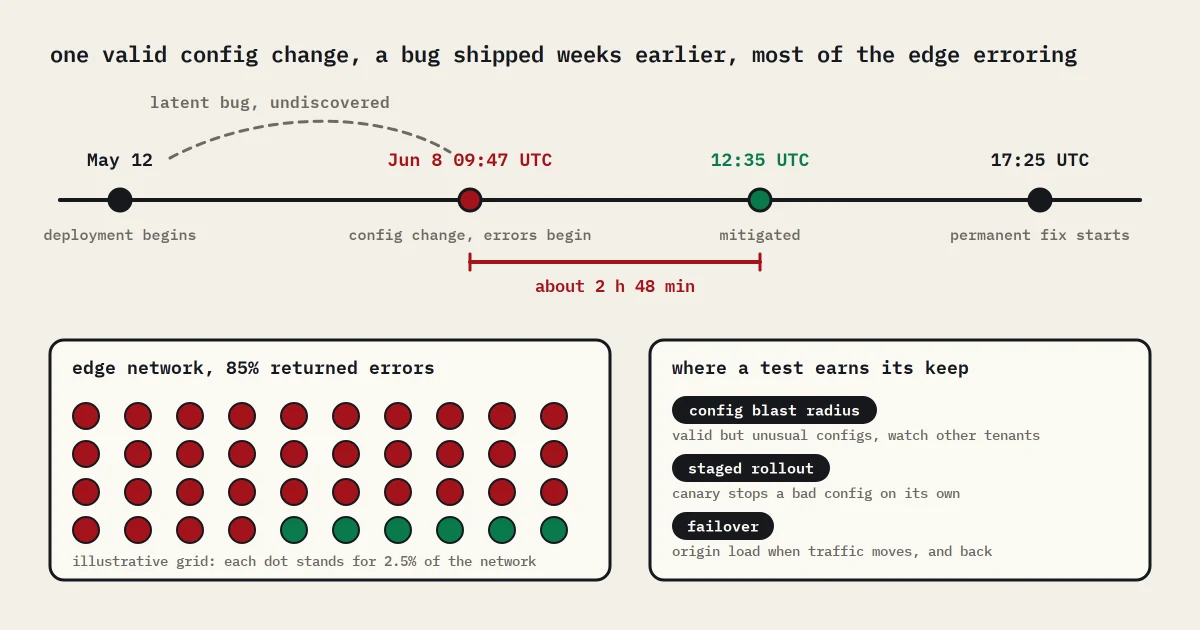
On June 8, 2021, a large share of Fastly’s edge network started returning errors for a little under three hours. Fastly’s own Summary of June 8 outage says the global disruption began at 09:47 UTC, that 85% of its network returned errors, and that the incident was mitigated at 12:35 UTC. The trigger was a valid customer configuration change that hit a bug shipped weeks earlier. For testers, the useful part is the shape of the failure: a latent defect, a small input and a wide blast radius.
What caused the Fastly outage
Fastly’s summary says a software deployment that began on May 12, 2021 introduced a bug. A specific customer configuration under specific circumstances triggered it, and it went undiscovered. On June 8, a customer pushed a valid configuration change that included those circumstances. Fastly describes the input as valid, so the customer did nothing wrong.
The summary gives this timeline, all in UTC on June 8:
- 09:47: global disruption begins.
- 09:48: Fastly’s monitoring identifies the disruption.
- 09:58: a status post is published.
- 10:27: engineers identify the customer configuration behind the disruption.
- 10:36: impacted services begin to recover.
- 11:00: the majority of services have recovered.
- 12:35: the incident is mitigated.
- 17:25: deployment of the permanent bug fix begins.
The summary also says that within 49 minutes, 95% of the network was operating normally. Engineers had identified and isolated the cause and disabled the configuration to get there. Fastly’s follow-up list includes deploying the fix across the network, a full review of its incident response, finding out why the bug was not caught in software quality assurance and testing, and improving remediation time. This article uses only what that summary states. It adds no internal detail about how the bug worked.
Three properties worth testing for
Three facts from the summary shape the test plan.
The defect was old before it was dangerous. The deployment began almost four weeks before the outage, and nothing happened until a matching input arrived. A release looks healthy for weeks while carrying a defect that needs a rare input.
The input was legitimate. No malformed request, attack or traffic spike was needed. Validation that rejects bad input would not have helped, because the input was good.
The blast radius was most of the network. One customer’s change affected 85% of the network, which means the failure crossed customer boundaries. Isolation between tenants and between points of presence did not contain it.
None of this requires you to run a CDN. If you operate a platform that accepts customer configuration and applies it across a fleet, the same three properties apply to you.
Test the blast radius of a configuration change
Start with the question the summary raises: how much does one valid configuration break at most?
Build a corpus of configurations that are valid by your own schema but unusual: the longest rule set, the most regex rules, deeply nested conditions, empty fields, maximum header counts, rare feature combinations and values at documented limits. Apply each one in a non-production environment that runs the same build as production, while a steady load runs against a second, unrelated tenant. Watch the unrelated tenant. If its error rate moves when someone else’s config changes, you have a cross-tenant blast radius.
Record three things per config: the unrelated tenant’s error rate, the time to apply, and whether the fleet kept serving while the config propagated. Fuzzing the schema with generated configs finds more than a hand-picked set, and it is cheap to repeat after every release.
Pair this with soak time. A defect that waits weeks for its trigger will not show up in a ten-minute run. Keep a long-running environment on the release candidate, and keep feeding it config changes at a realistic rate throughout.
Stage configuration rollouts and prove the canary works
The outage shows that a code rollout and a config rollout are separate risks. A release reaches every point of presence gradually and is still one config push away from failure.
Test your staged rollout as a system:
- Push a known-bad config to the canary group in a test environment and measure how long it takes for the automated check to notice.
- Confirm the rollout stops by itself and does not wait for a person to read a dashboard.
- Measure how many tenants and how much traffic the canary group covers. A canary that carries no meaningful traffic fails in no useful way.
- Measure the rollback path: time from the stop decision to the old config serving everywhere.
Fastly’s summary shows detection took one minute and mitigation took about 2 hours 48 minutes. Your detection and mitigation numbers will differ. Measure both, and treat a large gap between them as the finding.
Test failover to a second provider before you need it
When an edge provider fails, many teams move traffic to another provider or straight to the origin. That move changes the load on everything behind the edge.
A CDN absorbs most of the read traffic its customers see. If it fails open and requests go to the origin, or DNS shifts users to a backup CDN with an empty cache, the origin sees demand it was never sized for. The CDN and WAF load testing guide covers how to test the origin with the edge in and out of the path.
For a failover test, run the following in an environment you are authorized to disrupt:
- Establish a baseline with the primary edge serving a realistic mix, and record origin requests per second and cache hit ratio.
- Switch to the secondary path, whether that is a backup CDN, a direct route to origin or a static fallback.
- Hold the same user load and measure origin requests per second, p95 latency, error rate and connection counts.
- Switch back and measure again. Failing back with a cold primary cache is a second surge, and teams often skip testing it.
Check the secondary path’s configuration too. A backup provider that has never carried production traffic often has stale rules, missing certificates or lower rate limits. The cache purge testing article describes the same origin-refill effect in a smaller form.
Measure the origin under a cold cache
Even a successful failover empties the working set. Warm and cold runs should be separate scenarios, with labels. In the cold run, use realistic key cardinality and object sizes so misses reach the origin in the proportion production would see, then watch for retry amplification. Clients that retry immediately against a struggling origin turn a partial failure into a sustained one. Add jitter and a retry budget to the scenario and record both what the client does and what the origin sees.
The Roblox 2021 postmortem makes a related point: recovery has its own load shape, separate from the outage.
Run the whole incident as an exercise
A load test shows capacity. An incident rehearsal shows decisions. Run both on the same plan.
- Pick the failure: a config push that degrades one slice of the edge. Write down the start time, the person who owns the abort and the abort condition.
- Start a steady, representative load from outside your own network, so the test sees what a user sees.
- Apply the config change in the approved environment.
- Time each step: first alert, first human acknowledgement, cause identified, mitigation chosen, mitigation applied, traffic healthy. Fastly’s timeline has the same stages, and yours should have a number beside each.
- Switch traffic to the secondary path and record origin load and error rate.
- Switch back, and record the second surge.
- Reset synthetic state and confirm the next run starts from the same condition.
- Write down which signals fired first and which fired late or never.
The first run usually exposes a gap in monitoring or in ownership, not in capacity. That is the point of running it.
Use chaos experiments under load as the pattern for steps 3 to 6: inject the fault while the load runs, keep it short and reversible, and always keep an abort path.
Rehearsal checklist
- A corpus of valid but unusual configs exists and runs against a test environment on the release candidate.
- An unrelated tenant carries steady load during every config test, and its error rate is recorded.
- A known-bad config reaches the canary group, and the rollout stops without a person.
- Time from first alert to mitigation has a measured number, from a rehearsal and not from memory.
- The secondary path (backup CDN, direct origin or static fallback) carried load in a test this quarter.
- Origin requests per second, p95 and error rate are recorded for the switch and for the switch back.
- Warm and cold cache runs are labeled and reported apart.
- The report links the primary source for every claim about 2021 and keeps your own measurements in a separate section.
Questions this article answers
What caused the Fastly outage in 2021?
Fastly's summary says a software deployment that began on May 12, 2021 introduced a bug. The bug stayed undiscovered until June 8, when a customer pushed a valid configuration change that included the specific circumstances needed to trigger it.
How long was Fastly down on June 8, 2021?
Fastly's timeline puts the start of the global disruption at 09:47 UTC and the mitigation at 12:35 UTC, about 2 hours 48 minutes. Its summary says 95% of the network was operating normally within 49 minutes.
How much of Fastly's network was affected?
Fastly's summary says 85% of its network returned errors during the outage.
What should teams test after the Fastly outage?
Test what a single valid configuration change breaks, how config rolls out in stages, what your origin sees when the CDN fails or traffic shifts to a backup, and how fast you switch and switch back.