Staging or Production? Where Should You Run Load Tests?
Choose staging or production for load testing with a risk-based ladder covering fidelity, safety, observability, and evidence limits.
“Always test in staging” is safe advice until staging has different caches, quotas, data, network paths, or dependency behavior from production. “Test in production” helps only when you control the blast radius. Where you test is a decision about evidence and risk. It says nothing about who your team is.
Define what must be learned
If you want to know whether a new query uses too much database time, a production-shaped staging dataset may be enough. If you want to know how a regional edge behaves for real customers, an isolated environment cannot answer that alone. State the claim before you choose the environment.
Separate safety from fidelity. Production carries real users and durable state, so its safety bar is high. Staging may be safer and less representative. Write down which dimension is uncertain instead of calling one environment “realistic” in the abstract.
What staging is good at
Use staging to debug flows, validate data allocation, rehearse ramps, and prove observability without risking customer records. It suits one-user checks, correlation, schema validation, fault hypotheses, and most generator-capacity experiments.
Its weakness is divergence. A smaller node size can move the bottleneck. A shared test database can have different indexes. A warm staging cache can hide misses. A mock payment service can remove queueing. List these differences in the test brief, and do not present staging numbers as a direct guarantee of production capacity.
What production can reveal
A carefully controlled production test measures real routing, caches, quotas, autoscaling, and dependencies. It can also show behavior that exists only at live data volume. The payoff is high, and so is the cost of one wrong request.
Production testing needs target authorization, a maintenance or low-risk window, a strict ceiling, traffic isolation, synthetic identities, abort automation, and an owner who can stop the run. Avoid destructive writes unless someone has explicitly approved the complete transaction and cleanup path. Rate-limit the generator instead of trusting the application to protect itself.
Use an escalation ladder
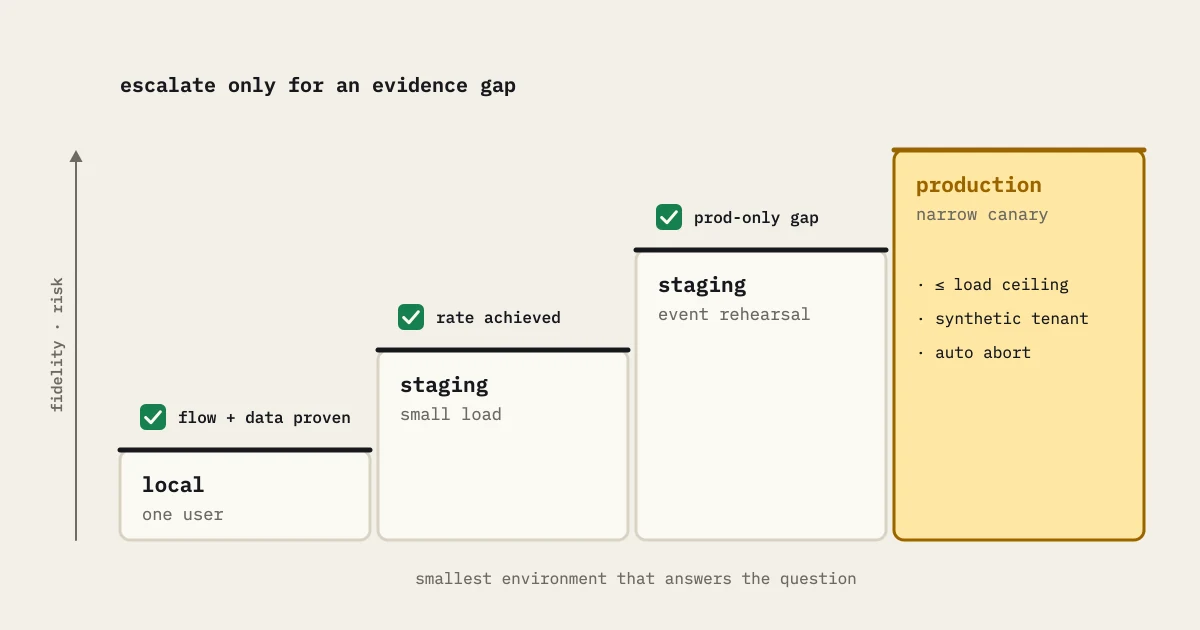
Start with a local or isolated functional flow. Move to a production-like staging environment for a small load. Rehearse the planned event shape with synthetic data and real telemetry. If a production-only question remains, run a narrow canary: a small cohort, a safe endpoint, a short duration, and an immediate stop rule. Step up only when the evidence supports the next rung.
Give each rung an exit condition. If the generator cannot reach its target, fix that before you change environments. If staging and production differ in ways that matter, carry the uncertainty forward. If a production canary moves customer indicators, stop and investigate. Do not file the run as “mostly successful.”
Make staging representative by constraint
Do not clone everything. Keep the constraints that govern the decision: data cardinality, hot-key distribution, connection limits, queue configuration, autoscaling delays, payload sizes, network hops, and feature flags. A smaller environment still helps if you record its scaling relationship and test the same failure mechanism.
For private systems, placement matters. A generator outside the network may spend its time negotiating access. A generator inside may skip the path customers use. The private load generation use case frames that boundary. Choose placement as part of the workload, not as an afterthought.
Compare evidence honestly
Store environment, version, topology, data state, load model, and telemetry with each run. Compare trends within one environment first. When you map staging to production, show the assumptions and avoid false precision. “This staging run suggests the database is the next experiment” is a stronger statement than “production supports exactly 4,000 users” when the evidence does not justify the number.
A decision table
- Debugging a script or data flow: isolated or staging.
- Testing a release candidate’s representative capacity: production-like staging.
- Testing a production-only cache, route, or quota behavior: controlled canary with approval.
- Testing destructive business writes: isolated data and an explicit recovery plan, never an informal production spike.
Choose the smallest environment that can answer the question. Escalate only to close an identified evidence gap. Record the escalation trigger before the run, so nobody mistakes a green staging result for blanket production evidence.
Before pressing start
Confirm authorization, target and data scope, generator placement, observability, thresholds, abort path, and recovery owner. Write down what the result cannot prove. That short review turns “staging or production?” from a slogan into a repeatable engineering decision.
Example environment decision
Say your team wants to know whether a new search index can handle a seasonal peak. Staging can answer query correctness, index use, payload size, and per-node saturation with synthetic data. It cannot tell you whether the production CDN cache, regional route, or real quota behaves the same. So the release test uses staging for diagnosis and a narrowly approved production canary for the remaining route question.
Write down the handoff between those tests. The staging run must prove the journey and find a safe rate. The canary must use that ceiling, a synthetic tenant, a short window, and an automated stop rule. If the canary disagrees, keep the difference instead of “calibrating” the staging result until it matches. The disagreement shows that the environment map was incomplete.
Afterward, record which claims each environment supports. Repeated staging evidence can stay automated. Production-only questions get a specific approval instead of a broad, risky load window.
Watch the canary’s customer-impact indicators in real time, and name who can abort without asking for another approval. When it ends, verify that synthetic state and queues have drained. A canary is not complete until the system is back in its ordinary operating condition.
Keep an evidence ledger for the transition: staging version, fixture version, approved canary ceiling, actual arrivals, customer-impact indicators, and cache or routing divergence. A later reader should be able to tell whether a difference came from environment fidelity or from the release. The ledger keeps a narrow canary from turning into an unsupported claim about every production path.
Review the canary after recovery as well as during traffic. Confirm synthetic writes are cleaned up, queues are drained, caches are in the expected state, and alerts behave normally again. If a cleanup step is manual, name its owner and its evidence. The safety argument includes the return path, because the next test starts in whatever state this one leaves behind.
Keep a staged decision record: what staging proved, what it could not prove, what the canary added, and what is still unknown. Future teams can then reuse safe evidence without treating a small environment as a production promise. It also narrows the approval: the canary covers a named route and synthetic tenant, and it is not an invitation to generate arbitrary traffic.
Add an explicit mismatch review before you publish the result. If staging has one worker replica while production has twelve, a green latency result says little about leader election, connection-pool distribution, or noisy-neighbor behavior. If the database is smaller, record whether the test answers an application question or a storage-capacity question. A reviewer should be able to point at each conclusion and name the production property behind it. When no such property exists, label the result exploratory and schedule a canary or a production-scale rehearsal instead of stretching the claim.
Last, compare observability as well as capacity. A staging dashboard may lack the production alert, sampling rule, or log field an on-call engineer depends on. During the same bounded test, check that you can trace the request across the edge, application, database, and queue, and that the alert would name the affected route. If a signal is missing, record it as a readiness gap. A green latency chart with no trustworthy way to detect regression is incomplete evidence for a production launch.