k6 vs JMeter: Choosing for Your Team, Not a Benchmark
Compare k6 and JMeter by maintenance, protocols, language, debugging, data, and execution needs instead of synthetic tool races.
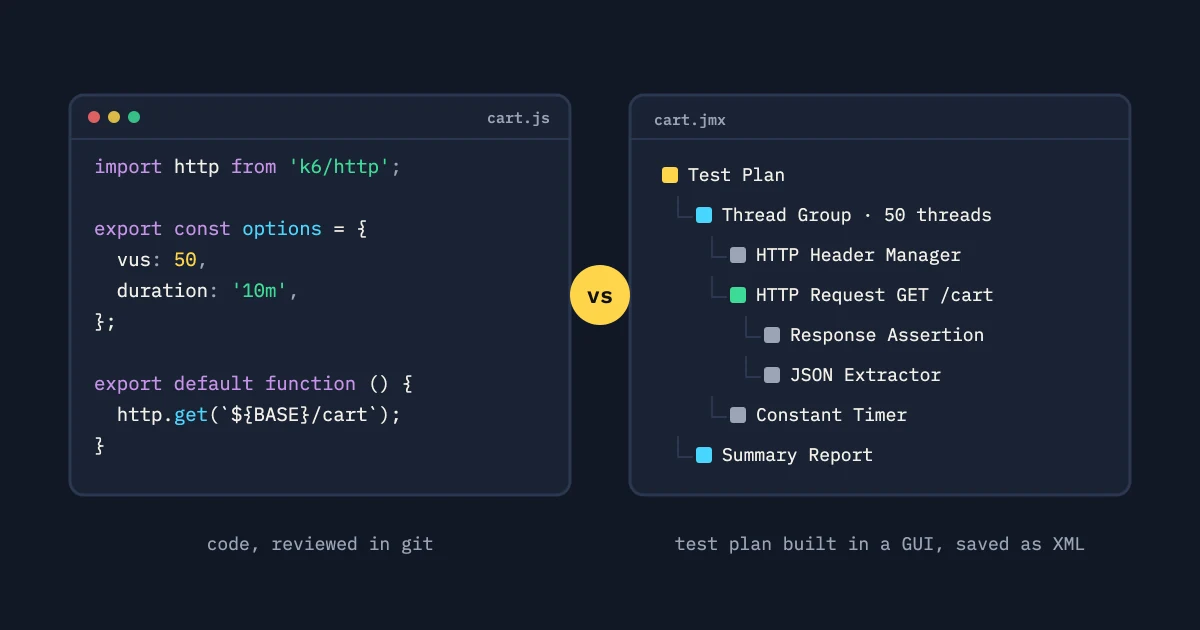
No tool wins a k6-versus-JMeter decision for everyone. Pick the one your team can review, debug, run in its target environment, and keep accurate as the product changes. Start from those constraints. A synthetic benchmark answers a different question.
Begin with the workload
List the protocols and interaction styles you need: HTTP APIs, browser-adjacent flows, WebSocket sessions, files, messaging, or a specialized client. Check support, and check how good the team’s existing examples are, before you compare syntax. A familiar tool only helps if it can model the state you need and report the evidence you need.
Then describe the load model. Both tools can express common closed and arrival-based workloads. Pacing, scenarios, correlation, checks, and distributed execution still need a small spike to test the details. A green “hello world” proves almost nothing about your real flow.
Maintenance is the long-term cost
Teams usually write k6 scripts as code. That suits teams that already review JavaScript-like test files, build helpers, and work through version control. JMeter stores a test plan as a structured XML file that you edit in its GUI or with other tooling. Some teams find that easy to pick up, and it gets hard to review as a plan grows.
Neither format stays maintainable on its own. A code file can turn into a maze of framework layers. An XML plan can turn into a fragile pile of copied elements. Set rules for names, variables, scenarios, transaction boundaries, data sources, and failure criteria. Keep one representative journey easy to read in a pull request.
Team language and onboarding
Ask who will change the test six months from now. A team at home with JavaScript, modules, and normal code review may prefer k6’s authoring model. A team with established Java libraries, JMeter experience, or a GUI-first exploratory workflow may get more done in JMeter. This says nothing about how sophisticated the engineers are. It measures how long the path is from a failure to a safe fix.
Run a paired exercise: add a new parameter, correlate a dynamic token, add one assertion, and split one journey into two scenarios. Time the review and note where the tool hides its assumptions. That exercise predicts more than a throughput chart from a different workload.
Debugging and observability
While authoring, developers need request details, extracted values, response bodies with secrets removed, and clear assertion messages. At scale, they need low-overhead measurements and proof that the generator kept to its schedule. Make sure your workflow can go from one-user diagnosis to distributed execution without changing what the test means.
Keep target telemetry next to generator telemetry. A slow run may come from a database pool, a network path, or the load client itself. Record status codes and business assertions separately. The anatomy of a load-test result works as a checklist for either engine.
Protocols and ecosystem
List the libraries, reporters, CI runners, secrets handling, and test data your organization already runs. A tool with the protocol adapter you want is no win if its version lifecycle or security review is unclear. Replacing a working JMeter suite with a new language also has a migration cost. State that cost instead of hiding it.
Use the smallest proof that exercises the risky adapter. Check authentication, redirects, compression, streaming, TLS, file uploads, or custom headers, whichever apply. If you compare implementations, keep the same acceptance criteria in both tools. Otherwise you are comparing different tests.
Execution and result ownership
Decide where generators run, how many you need, how their clocks and data partitions work, and where results stay available. The tool is one part of that architecture. Write the execution boundary into the decision record: network placement, data handling, and who owns a failed worker. Those constraints often matter more than a small difference in authoring syntax.
A decision matrix that stays honest
Score each option against your real constraints: required protocols, authoring fluency, reviewability, correlation, data handling, generator footprint, deployment locations, result retention, CI integration, and exit path. Weight the criteria by the decision you have to make. Give no points for features the test will never use.
The practical answer may be to keep both: one tool for an established protocol suite, another for a new scenario. Standardize result labels and pass rules so you can compare the two engines. Choose the smallest migration that improves evidence, maintainability, or execution reliability.
The best tool is the one whose failures your team can explain. Pick it, document its boundaries, and revisit the decision when the workload changes, not when a benchmark headline does.
Run a fair bake-off
Build one small, identical journey in both tools: authenticate with a synthetic identity, read a record, make a safe mutation, verify the result, and clean up. Use the same arrival shape, data partition, timeout policy, labels, and acceptance rules. Have two engineers review each implementation without the author walking them through every abstraction. Note how fast a reviewer finds the request, the assertion, and the cause of a failure.
Then test one risky feature from the real suite: dynamic token extraction, a streaming response, a large payload, or a dependency timeout. Judge authoring and diagnosis effort qualitatively. Do not turn a tiny exercise into a made-up performance benchmark. The result should say which tool fits the team’s maintenance and execution constraints.
Revisit the decision when the protocol, ownership, or deployment boundary changes. A team may keep JMeter plans for an established integration and use k6 for a code-reviewed API suite. A shared result vocabulary and a safe execution path matter more than forcing one engine onto every workload.
Include the operational boundary
Ask how the artifact is versioned, how dependencies are pinned, where workers run, how secrets get into the run, how results are kept, and who upgrades the execution image. If your team can write a script but cannot reproduce its environment, you have not solved maintainability.
Test the failure that matters to your team. If network placement is sensitive, run from the required private location. If result labels drive release decisions, check that both implementations keep the same transaction names and error classes. Write down the rejected option’s strengths as well as its limits, so a future benchmark does not trigger a migration nobody needs.
The decision record should name a review date and the triggers for reconsidering: a new protocol, a changed deployment boundary, a maintenance owner leaving, or a result-retention requirement. That ties the tool choice to workload and team constraints instead of fashion.
Last, check portability. Can another engineer run the artifact from documented configuration, get the same labels, and find the result? If not, the missing setup is part of the tool’s cost. Make it visible before you choose on authoring syntax alone.
Prefer a decision you can reverse. Keep the smallest representative test in the current engine while you prove the new option. Migrate only a workload with a documented maintenance or execution problem. That keeps a tool migration from turning into a performance project nobody measures.
Reconsidering the choice is routine maintenance. It does not mean the first choice was wrong.
A fair migration exercise
Take one existing journey and build it in both tools with identical synthetic data, pacing, retries, labels, and assertions. Review each one as a pull request. Then make a small product change, such as a new field or token, and compare the diffs. This measures reviewability and maintenance friction without treating a tiny sample as a tool benchmark.
Include the deployment path. Run from the intended worker location, load credentials through the approved mechanism, and keep the result with its environment. A tool that is easy to author in but hard to run safely has not solved your team’s problem.